
IPv6 Configuration Guide K/KA/KB.15.15
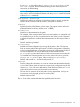
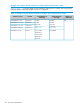
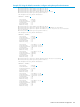
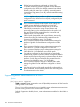
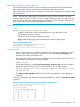
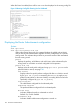
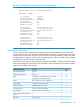

When RA Guard is enabled, there will be one or two lines displayed in the running config file.
Figure 18 Running Config File Showing Line for RA-Guard
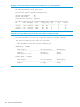
Displaying the Router Advertisement configuration
Syntax:
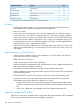
show ipv6 nd ra
show ipv6 nd ra prefix vlan vid
Without the optional keywords, this command displays the global and per-VLAN,
and per tunnel router advertisement neighbor discovery configuration on a specific
routing switch. This indicates the per-VLAN or per-tunnel content of RAs transmitted
from the routing switch.
prefix
Displays the prefixes, valid lifetime, and onlink/auto values advertised by the
routing switch on all VLANs or tunnels configured for RA operation.
prefix vlan vid
Displays values for each prefix configured using ipv6 nd ra prefix on the
specified VLAN or tunnel; see page 189.
IPv6 Prefix
Displays values for specific prefixes configured for RAs on a VLAN or tunnel
by the ipv6 nd ra prefix command, plus Default (to apply to any
global unicast prefixes on the same VLAN(s) or tunnel(s) that have not been
specifically configured by ipv6 nd ra prefix).
Valid Lifetime
The valid lifetime configured for the indicated prefix.
Preferred Lifetime
The preferred lifetime configured for the indicated prefix.
On-link Flag
Indicates whether the prefix is advertised as on-link.
Default: On; On-link enabled.
Autonomous Flag
Indicates whether address autoconfiguration is turned on.
196 IPv6 Router Advertisements