
IPv6 Configuration Guide K/KA/KB.15.15


area-id
This must be the same for both ABRs in the link and is the area number of the
virtual link transit area in either decimal or 32-bit dotted decimal format.
If area-id is not already configured on the routing switch, this command
creates it.
router-id
On an ABR directly connected to the backbone area, this value must be the
router ID of an ABR (in the same area) needing a virtual link to the backbone
area as a substitute for a direct physical connection.
On the ABR that needs the virtual link to the backbone area, this value must be
the router ID of the ABR (in the same area) having a direct physical connection
to the backbone area.
The no form removes the virtual link.
Example 143 Configuring a virtual link
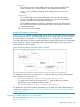
Figure 21 (page 223) shows an OSPFv3 ABR, routing switch "A" that lacks a direct connection to
the backbone area (area 0). To provide backbone access to routing switch "A," you can add a
virtual link between routing switch "A" and routing switch "C," using area 1 as a transit area.
To configure the virtual link, define it on the routers that are at each end of the link. No configuration
for the virtual link is required on the other routers on the path through the transit area (such as
routing switch "B" in this example).
Figure 21 Defining OSPFv3 virtual links within a network
To configure the virtual link on routing switch "A," enter the following command specifying the
area 1 interface on routing switch "C":
HP Switch(ospf3)# area 1 virtual-link 209.157.22.1
To configure the virtual link on routing switch "C," enter the following command
specifying the area 1 interface on routing switch "A."
HP Switch(ospf3)# area 1 virtual-link 10.0.0.1
For descriptions of virtual link interface parameters you can either use in their default settings or
reconfigure as needed, see “About adjusting virtual link performance by changing the interface
settings” (page 261).
Adjusting a dead interval on a virtual link
For more information, see “About adjusting virtual link performance by changing the interface
settings” (page 261).
Configuring a virtual link 223