
IPv6 Configuration Guide K/KA/KB.15.15
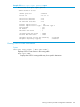


vlan vid
Resets only those counters in the specific VLAN.
tunnel tunnel-id
Using the tunnel option resets only those counters in the specific tunnel.
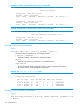
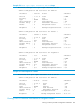
Example 160 Displaying OSPFv3 traffic statistics for all VLANs configured for OSPFv3 operation
HP Switch# show ipv6 ospf3 statistics
OSPFv3 statistics for Interfaces
Interface Total Tx Total Rx Total Errors
------------ --------------- --------------- ------------
Vlan-22 9022 9018 3
Vlan-55 28041 28480 15
tunnel-3 5432 5430 2
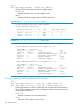
Example 161 Displaying OSPFv3 statistics for a single VLAN
HP Switch# show ipv6 ospf3 statistics vlan 55
OSPFv3 statistics for VLAN 55
Tx Hello Packets : 26005 Rx Hello Packets : 26005
Tx DD Packets : 3 Rx DD Packets : 3
Tx LSR Packets : 1 Rx LSR Packets : 1
Tx LSU Packets : 1436 Rx LSU Packets : 1046
Tx LSA Packets : 615 Rx LSA Packets : 1444
OSPFv3 Errors : 0
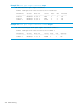
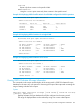
Example 162 Displaying OSPFv3 Statistics for a Tunnel
HP Switch# show ipv6 ospf3 statistics tunnel 3
OSPFv3 statistics for Tunnel 3
Tx Hello Packets : 26000 Rx Hello Packets : 26000
Tx DD Packets : 3 Rx DD Packets : 3
Tx LSR Packets : 1 Rx LSR Packets : 1
Tx LSU Packets : 1436 Rx LSU Packets : 1046
Tx LSA Packets : 615 Rx LSA Packets : 1444
OSPFv3 Errors : 0
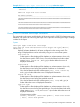
Viewing OSPFv3 link-state AS-scope information
The commands in this section enable display of the routing-switch's OSPFv3 link-state AS-scope
database for the entire AS, with options for narrowing the scope of the output and increasing the
range of settings included in the output.
Syntax:
show ipv6 ospf3 link-state as-scope [ lsid lsid-# ] [ router-id rtr-id-#
] [ detail | advertise ]
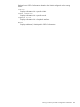
Displays link-state AS-scope database for all links configured on the routing switch.
The range of displayed data can be reduced by using one or more subset options:
Viewing a summary of OSPFv3 configuration information 237