
IPv6 Configuration Guide K/KA/KB.15.15
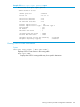
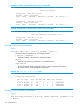
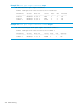
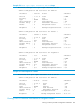
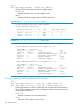
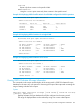

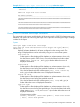
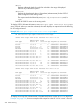

Example 164 show ipv6 ospf3 link-state as-scope advertise output
HP Switch# show ipv6 ospf3 link-state as-scope router-id 15.1.1.2
advertise
OSPFv3 AS Scope Link State Database
Raw Advertisements
------------------------------------------------------------------------
1d6e4005000000000f01010280000037b76b00280500000a400000002620000f00000000
00000000
19f64005000000020f01010280000062b3d100380700000a400000002620000b00000000
2620000a00000000000000000011000100000000
19cc4005000000030f01010280000062dfa000380700000a400000002621000e00000000
2620000a00000000000000000011000100000000
Viewing OSPFv3 link-state Area-Scope information
The commands in this section enable display of the routing-switch's OSPFv3 link-state area-scope
database, with options for narrowing the scope of the output and increasing the range of settings
included in the output.
Syntax:
show ipv6 ospf3 link-state area-scope
area area-id lsid lsid-# router-id rtr-# type lsa-type [ detail |
advertise ]
Displays link-state database for all areas configured on the routing switch. The
range of displayed data can be reduced by using one or more subset options:
area area-id
Subset option to filter displayed LSA database or advertisements to show only
the data from a specific OSPFv3 area. Can also be filtered with other subset
options (lsid, router-id , and type) to further define the source of
displayed information.
lsid lsid-#
Subset option to filter displayed LSA database or advertisements to show only
the data from sources having the specified IP address as a link-state ID.
Can also be filtered with other subset options (area, lsid, router-id,
and type) to further define the source of displayed information.
router-id rtr-#
Subset option to filter displayed LSA database or advertisements to show only
the data from sources having the specified router ID.
Can also be filtered with other subset options (area, lsid, and type) to
further define the source of displayed information.
type lsa-type
Subset option to filter displayed LSA database or advertisements to show only
the data from sources having the specified type. Can also be filtered with other
subset options (area, lsid, and router-id) to further define the source of
displayed information.
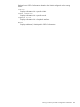
LSA type options include:
router | network | inter-area-prefix | inter-area-router
| nssa | intra-area-prefix
Viewing a summary of OSPFv3 configuration information 239