
IPv6 Configuration Guide K/KA/KB.15.15
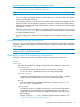
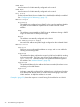
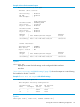
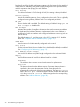
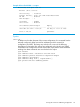
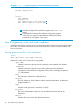
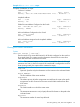
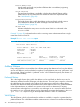
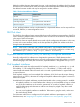
Displays IP and IPv6 global configuration settings, the IPv6 status for the specified
VLAN, the IPv6 addresses (with prefix lengths) configured on the specified VLAN,
and the expiration data (Expiry) for each address.
IPv6 Routing
For software releases K.13.01 through K.14.01, this setting is always Disabled.
Default Gateway
Lists the IPv4 default gateway, if any, configured on the switch. This is a globally
configured router gateway address and is not configured per-VLAN
ND DAD
Shows whether ND is enabled. The default setting is Enabled. Using ipv6 nd
dad- attempts 0 disables ND.
DAD Attempts
Indicates the number of neighbor solicitations the switch transmits per-address
for duplicate (IPv6) address detection. Implemented when a new address is
configured or when an interface with configured addresses comes up (such as
after a reboot).
The default setting is 3, and the range is 0 to 255. A setting of "0" disables
DAD. See “Duplicate address detection (DAD)” (page 31).
VLAN Name
Lists the name of a VLAN statically configured on the switch.
IPv6 Status
For the indicated VLAN, shows whether IPv6 is disabled (the default) or enabled.
See “Configuring IPv6 addressing” (page 12).
IPv6 Address/Prefix Length
Lists each IPv6 address and prefix length configured on the indicated VLAN.
Expiry
Lists the lifetime status of each IPv6 address listed for a VLAN:
Permanent
The address does not time out and need renewal or replacement.
date/time
The date and time that the address expires. Expiration date and time is
specified in the router advertisement used to create the prefix for
automatically configured, global unicast addresses. The Address Status
field in the show ipv6 command output indicates whether this date/time
is for the preferred or valid lifetime assigned to the corresponding
address. See “Address lifetimes” (page 28).
24 IPv6 Addressing Configuration