
IPv6 Configuration Guide K/KA/KB.15.15

The decapsulator matches received packets to the tunnels it has configured, and only processes
packets where the IPv4 source and destination addresses match the endpoint addresses of the
configured tunnels. A tunnel’s IPv4 address must be the same on both the encapsulator and the
decapsulator. IPv4 routing switches route the packet based on the IPv4 header.
IPv6 traffic can travel the tunnel in either direction. Each end node can be either the encapsulator
or the decapsulator depending on the flow of the IPv6 traffic.
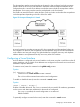
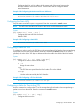
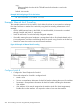
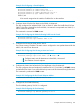
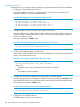
Figure 27 Conceptual Example of a Tunnel
A tunnel is treated as a single point-to-point link; the encapsulator and decapsulator behave as
IPv6 neighbors on that link. The encapsulator and decapsulator assign IPv6 link-local addresses
to the interface and may also assign IPv6 global addresses. Neighbor discovery and duplicate
address detection are implemented as they are on any other IPv6 interface.
Configuring a Tunnel Interface
An IPv6 address is configured on the tunnel interface in the same way that it would be on other IP
routing interfaces, such as VLANs. IPv4 addresses are configured as the tunnel source and tunnel
destination endpoint addresses.
To create a tunnel, enter this command in the global config context.
Syntax
[no] interface tunnel 1 - 128
Creates a tunnel. Tunnel interface context is entered.
The no form of the command removes the tunnel configuration.
To enable or disable the tunnel, enter this command in tunnel context.
Syntax
tunnel [ enable | disable ]
Enables or disables the tunnel. The enable command only succeeds if all mandatory parameters
such as source and destination addresses for the tunnel are configured.
If disable is specified, the tunnel configuration is not removed.
Default: Enabled
To optionally configure a name for the tunnel, enter this command in tunnel context.
Configuring a Tunnel Interface 263