
IPv6 Configuration Guide K/KA/KB.15.15

Syntax
[no] tunnel name string
Optional; Provides a name for the tunnel. The name must be unique for all existing
tunnels. The no form of the command removes the name for the tunnel.
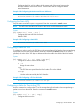
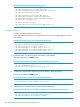
Example 178 Creating, Enabling, and Naming a Tunnel
HP Switch(config)# interface tunnel 3
HP Switch(tunnel-3)# tunnel enable
HP Switch(tunnel-3)# tunnel name Redtunnel
Configuring the Tunnel Mode
The tunnel mode configures the tunnel encapsulation type. The only mode currently supported is
6in4 mode.
Syntax
[no] tunnel mode [ 6in4 | unspecified ]
Configures the type of tunnel.
6in4
IPv6 packets encapsulated and transported over an IPv4 network.
unspecified
Set the tunnel to be unspecified.
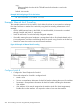
Example 179 Configuring Tunnel Mode
HP Switch(tunnel-3)# tunnel mode 6in4
Configuring the Tunnel Source
When encapsulating a packet, the source IP address is used in the encapsulating IPv4 header.
When decapsulating a packet, this address is matched against the destination IP address in the
encapsulating IPv4 header to determine if the packet was received on a valid, configured tunnel.
The command is executed in tunnel context.
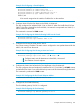
Syntax
[no] tunnel source [ ipv4-addr | ipv6-addr ]
Configures the IPv4 or IPv6 address of the source (local) end of the tunnel. Must
not be the same address as the tunnel destination.
Tunnel mode must be configured before tunnel source.
You cannot configure the same source and destination address pair on more than one tunnel
interface.
Configuring the Tunnel Destination
When an encapsulating packet is sent into a tunnel, the tunnel destination address is used in the
encapsulating IPv4 header. When decapsulating a packet, this address is matched against the
source IP address in the encapsulating IPv4 header to determine if the packet was received on a
valid, configured tunnel. The command is executed in tunnel context.
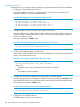
Syntax
[no] tunnel destination [ ipv4-addr | ipv6-addr ]
264 IPv6 Tunneling Over IPv4 Using Manually Configured Tunnels