
IPv6 Configuration Guide K/KA/KB.15.15
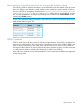
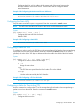
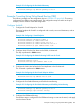
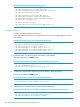

Example 184 Configuring a Tunnel Endpoint
HP Switch(config)# interface tunnel 1
HP Switch(tunnel-1)# tunnel mode 6in4
HP Switch(tunnel-1)# tunnel source 20.0.0.1
HP Switch(tunnel-1)# tunnel destination 30.0.0.1
HP Switch(tunnel-1)# ipv6 address 5000::1/64
5000::1/64
IPv6 network assigned to the interface. Enables IPv6 on the interface.
2. Configure VLAN 2 for the IPv6 Hosts on the 3000::/64 Network
This step configures IPv6 address 3000::1/64 on VLAN 2. When IPv6 traffic from IPv6 host
3000::2/64 that is destined for the IPv6 4000::/64 network is transported over VLAN 2, it
will be routed into the tunnel.
The command is executed in VLAN context.
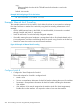
Example 185 Configuring the VLAN for Routing Traffic into the Tunnel
HP Switch(config)# vlan 2
HP Switch(vlan-2)# ipv6 address 3000::1/64
3. Configure IPv6 Routing to Route into the Tunnel
IPv6 unicast routing is enabled. The static route is configured to route packets destined for the
4000::/64 network into the tunnel.
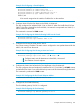
Example 186 Configuring IPv6 Routing to Route into Tunnel
HP Switch(config)# ipv6 unicast routing
HP Switch(config)# ipv6 route 4000::/64
1
5000::2
2
1
Configures static route for destinations in the 4000::/64 network
2
IPv6 address of tunnel endpoint
4. Configure the VLAN Used to Reach the First Hop Router in the IPv4 Network
This step configures the tunnel endpoint IPv4 address 20.0.0.1/24 (VLAN 1) in VLAN 2 context
so that traffic from VLAN 2 can reach the first hop router in the IPv4 network through the tunnel.
The command is performed in VLAN context.
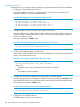
Example 187 Configuring the IPv4 Tunnel Endpoint Address
HP Switch(vlan-2)# ip address 20.0.0.1/24
5. Configure the IPv4 Default Gateway
The IPv4 default gateway 20.0.0.2 is configured.
Example 188 Configuring the IPv4 Gateway
HP Switch(config)# ip default-gateway 20.0.0.2
Example: Manual 6in4 Tunneling 267