
IPv6 Configuration Guide K/KA/KB.15.15
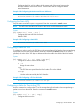

Example 193 Configuring the IPv4 Default Gateway
HP Switch(config)# ip default-gateway 30.0.0.2
Example: Tunneling Using Policy-Based Routing (PBR)
The following example uses the configuration shown in Example 193 (page 269). The routing
configuration uses PBR to route into the tunnel. The configuration steps are similar to the prior
example, with the addition of the PBR configuration.
Configure Switch B
1. Configure the Tunnel Endpoint for Switch B
The tunnel endpoint for Switch B is configured with a mode, source and destination, and an
IPv6 address.
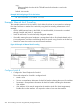
Example 194 Configuring a Tunnel Endpoint
HP Switch(config)# interface tunnel 1
HP Switch(tunnel-1)# tunnel mode 6in4
HP Switch(tunnel-1)# tunnel source 20.0.0.1
HP Switch(tunnel-1)# tunnel destination 30.0.0.1
HP Switch(tunnel-1)# ipv6 address 5000::1/64
2. Configure VLAN 2 for the IPv6 Hosts on the 3000::/64 Network
This step is performed in VLAN context.
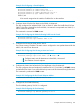
Example 195 Configuring the VLAN for Routing Traffic into the Tunnel
HP Switch(config)# vlan 2
HP Switch(vlan-2)# ipv6 address 3000::1/64
3. Configure the VLAN Used to Reach the First Hop Router in the IPv4 Network
This command is performed in VLAN context.
Example 196 Configuring the IPv4 Tunnel Endpoint Address
HP Switch(vlan-2)# ip address 20.0.0.1/24
4. Configure the IPv4 Default Gateway and Enable Unicast Routing
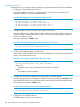
Example 197 Configuring the IPv4 Default Gateway and Enabling Unicast Routing
HP Switch(config)# ip default-gateway 20.0.0.2
HP Switch(config)# ipv6 unicast routing
5. Configure IPv6 PBR-Based Routing
Execute these steps to configure the IPv6 PBR-based routing to route into the tunnel, and apply
it to the inbound VLAN.
Example: Tunneling Using Policy-Based Routing (PBR) 269