
IPv6 Configuration Guide K/KA/KB.15.15
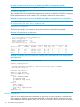
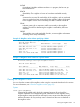
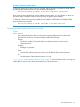
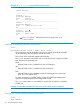

Example 20 show telnet output with three sessions active
HP Switch# show telnet
Telnet Activity
----------------------------------------------------
Session : 1
Privilege: Manager
From : Console
To : 10.0.10.140
----------------------------------------------------
Session : 2
Privilege: Manager
From : 2620:0:260:212::2:219
To :
----------------------------------------------------
Session : ** 3
1
Privilege: Manager
From : fe80::2:101
To :
1
The ** in “Session:” indicates the session through which show
telnet was run.
Enabling or disabling inbound Telnet access
Syntax:
[no] telnet-server listen [ oobm | data | both ]
This command is used at the global config level to enable (the default) or disable
all (IPv4 and IPv6) inbound Telnet access to the switch.
The no form of the command disables inbound telnet.
The listen parameter is available only on switches that have a separate OOBM
port. Values for this parameter are:
oobm
Inbound Telnet access is enabled only on the OOBM port.
data
Inbound Telnet access is enabled only on the data ports.
both
Inbound Telnet access is enabled on both the OOBM port and on the data
ports. This is the default value.
For more information on OOBM, see the "Network Out-of-Band Management"
Appendix in the Management and Configuration Guide.
The listen parameter is not available on switches that do not have a separate
OOBM port.
Example 21 To disable IPv4 and IPv6 Telnet access to the switch, use this command:
HP Switch(config)# no telnet-server
Viewing the current inbound Telnet configuration
Syntax:
show console
40 IPv6 Management Features