
IPv6 Configuration Guide K/KA/KB.15.15
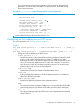

The no form of the command disables the client or server functionality.
Default: TFTP client and server functionality enabled
NOTE: To disable all TFTP client or server operation on the switch except for the auto-TFTP feature,
enter the no tftp [ client | server ] command. To re-enable TFTP client or server
operation, re-enter the tftp [ client | server ] command. (Entering no tftp without
specifying client or server affects only the client functionality. To disable or re-enable the TFTP server
functionality, you must specify server in the command.)
When TFTP is disabled, instances of TFTP in the CLI copy command and the Menu interface
"Download OS" screen become unavailable.
The no tftp [ client|server ] command does not affect auto-TFTP operation. For more
information, see “Using auto-TFTP for IPv6” (page 48).
Copying files over IPv6 using TFTP
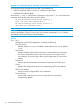
Syntax:
copy tftp target ipv6-addr filename [ oobm ]
Copies (downloads) a data file from a TFTP server at the specified IPv6 address to
a target file on a switch that is enabled with TFTP server functionality.
ipv6-addr
If this is a link-local address, use this IPv6 address format:
fe80::device-id %vlan vid
For example:
fe80::123%vlan10
If this is a global unicast address, use this IPv6 format:
ipv6-addr
For example:
2001:db8::123
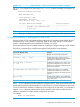
target
One of the following values:
autorun-cert-file
Copies an autorun trusted certificate to the switch.
autorun-key-file
Copies an autorun key file to the switch.
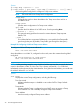
command-file
Copies a file stored on a remote host and executes the ACL command script
on the switch. Depending on the ACL commands stored in the file, one of
the following actions is performed in the running-config file on the switch:
• A new ACL is created.
• An existing ACL is replaced.
• match, permit, or deny statements are added to an existing ACL.
For more information on ACLs, see "Creating an ACL Offline" in the
“Access Control Lists (ACLs)” chapter in the Access Security Guide.
46 IPv6 Management Features