
IPv6 Configuration Guide K/KA/KB.15.15
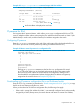
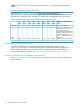

Example 28 snmpv3 targetaddress command output with IPv6 address
HP Switch(config)# show snmpv3 targetaddress
snmpTargetAddrTable [rfc2573]
Target Name IP Address Parameter
---------------- ----------------------- ----------
1 15.29.17.218 1
2 15.29.17.219 2
PP.217 15.29.17.217 marker_p
PP.218 2620:0:260:211
:217:a4ff:feff:1f70
1
marker_p
1
An IPv6 Address is displayed on two lines
IP preserve for IPv6
IPv6 supports the IP preserve feature, which allows you to copy a configuration file from a TFTP
server to multiple switches without overwriting the IPv6 address and subnet mask on VLAN 1 (the
default VLAN) in each switch, and the Gateway IPv6 address assigned to the switch.
Configuring IP preserve
Enter the ip preserve statement at the end of the configuration file to be downloaded from a
TFTP server. (You do not invoke IP preserve by entering a command from the CLI.)
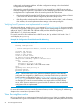
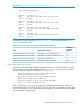
Example 29 How to enter IP preserve in a configuration file
; J8697A Configuration Editor; Created on release #K.15.xx
hostname "HP Switch"
time daylight-time-rule None
*
*
*
*
*
*
password manager
password operator
ip preserve
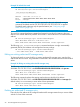
Entering an ip preserve statement as the last line in a configuration file stored
on a TFTP server allows you to download and execute the file as the startup-config
file on an IPv6 switch. When the switch reboots, the configuration settings in the
downloaded file are implemented without changing the IPv6 address and gateway
assigned to the switch as shown in Example 30 (page 52).
Downloading an IP preserve configuration file to an IPv6-based switch
Enter the TFTP copy command, as described in “SNMP management for IPv6” (page 54), to copy
the file as the new startup-config file on a switch.
When you download an IP Preserve configuration file, the following rules apply:
• If the switch's current IPv6 address for VLAN 1 was statically configured and not dynamically
assigned by a DHCP/Bootp server, the switch reboots and retains its current IPv6 address,
IP preserve for IPv6 51