
IPv6 Configuration Guide K/KA/KB.15.15

For more information on OOBM, see the "Network Out-of-Band Management"
Appendix in the Management and Configuration Guide.
The listen parameter is not available on switches that do not have a separate
OOBM port.
NOTE: For both IPv4 and IPv6, the switch supports only SSH version 2. You cannot set up an
SSH session with a client device running SSH version 1.
For more information on how to configure SSH for encrypted, authenticated transactions between
the switch and SSH-enabled client devices, see the "Configuring Secure Shell (SSH)" chapter in
the latest Access Security Guide for your switch.
Displaying an SSH configuration
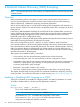
To verify an SSH configuration and display all SSH sessions running on the switch, enter the show
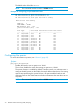
ip ssh command. Information on all current SSH sessions (IPv4 and IPv6) is displayed.
Example 36 SSH configuration display
With SSH running, the switch supports one console session and up to five other SSH and Telnet
(IPv4 and IPv6) sessions.
WebAgent sessions are also supported, but are not displayed in show ip ssh output.
Source IPv6 IP addresses of SSH clients are displayed in hexadecimal format.
HP Switch# show ip ssh
SSH Enabled : Yes Secure Copy Enabled : No
TCP Port Number : 22 Timeout (sec) : 120
Host Key Type : RSA Host Key Size : 2048
Ciphers : aes128-cbc,3des-cbc,aes192-cbc,aes256-cbc,
rijndael-cbc@lysator.liu.se,aes128-ctr,aes192-ctr,
aes256-ctr
MACs : hmac-md5,hmac-sha1,hmac-sha1-96,hmac-md5-96
Ses Type | Source IP Port
--- -------- + ---------------------------------------- -----
1 console |
2 ssh | 10.168.31.114 1722
3 inactive |
4 inactive |
5 inactive |
6 inactive |
Displays the current SSH configuration and status.
The switch uses these five SSH settings internally for transactions with clients.
Performing secure file transfers to and from IPv4 and IPv6 client devices
For more information, see “SCP and SFTP for IPv6” (page 67).
Syntax:
[no] ip ssh filetransfer
Enables SSH on the switch to connect to an SCP or SFTP client application to transfer
files to and from the switch.
Use the no ip ssh filetransfer command to disable the switch's ability to
perform secure file transfers with an SCP or SFTP client, without disabling SSH on
the switch.
Performing secure file transfers to and from IPv4 and IPv6 client devices 61