
IPv6 Configuration Guide K/KA/KB.15.15
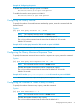
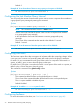
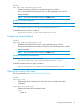
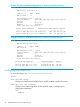

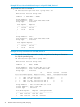
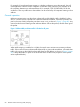

Example 41 Configuring the querier
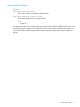
To disable the switch from acting as querier on VLAN 8:
HP Switch(vlan-8)# no ipv6 mld querier
To enable the switch to act as querier on VLAN 8:
HP Switch(vlan-8)# ipv6 mld querier
Configuring the Query Interval
To specify the number of seconds between membership queries, enter this command with the
desired interval.
Syntax
[no] ipv6 mld query-interval 60 - 31744
NOTE: This command must be issued in a VLAN context.
Specifies the number of seconds between membership queries.
The no form of the command sets the interval to the default of 125 seconds.
Default: 125 seconds.
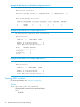
Example 42 To set the query-interval to 300 seconds on ports in VLAN 8:
HP Switch(vlan-8)# ipv6 mld query-interval 300
Configuring the Query Maximum Response Time
To specify the maximum amount of time to wait for a response to a query, enter this command.
Syntax
[no] ipv6 mld query-max-response-time 10 - 128
NOTE: This command must be issued in a VLAN context.
Specifies the number of seconds to wait for a response to a query.
The no form of the command sets the interval to the default of 10 seconds.
Default: 10 seconds.
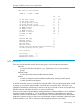
Example 43 To set the query-max-response-time to 30 seconds on ports on VLAN 8:
HP Switch(vlan-8)# ipv6 mld query-max-response-time 30
Configuring the Number of Times to Retry a Query
To specify the number of times to retry a query, enter this command.
Syntax
[no] ipv6 mld robustness 1 - 8
NOTE: This command must be issued in a VLAN context.
Specifies the number of times to retry a query.
The no form of the command sets the interval to the default of 2.
Configuring the Query Interval 71