
Multicast and Routing Guide K/KA/KB.15.15
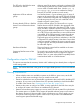
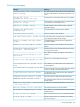
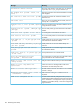

4. Option: Change one or more of the traffic control settings for the pim-sparse of a given VLAN
on which PIM-SM is enabled. (Note that some VLAN context control settings apply to both
PIM-SM and PIM-DM).
OperationFeatures accessed in VLAN- vid -pim-sparse
context
Sets or resets the source IP address for PIM-SM packets
sent out on the interface. Also enables PIM-SM on the
interface. (Default: any)
ip-addr(page 68)
Resets the interval between transmitted PIM Hello packets
on the interface. (Default: 30 seconds)
hello-interval
1, 1
(page 68)
Resets the maximum delay for transmitting a triggered
PIM Hello packet on the interface. (Default: 5 seconds)
hello-delay
1
(page 69)
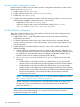
Enables or disables the LAN prune delay feature on the
interface. (Default: on)
lan-prune-delay
1
(page 69)
Resets the override interval of the LAN prune delay
configured on the interface. (Default: 2500 milliseconds)
override-interval
1
(page 70)
Resets the delay interval for triggering LAN prune delay
packets on the interface. (Default: 500 milliseconds)
propagation-delay
1
(page 70)
Resets the priority of the interface in the Designated Router
election process. (Default: 1)
If you want one router on a given VLAN to have a higher
priority for DR than other routers on the same VLAN, use
the dr-priority command to reconfigure the DR
priority setting as needed. Otherwise, the highest DR
priority among multiple routers on the same VLAN
interface is assigned to the router having the highest
source IP address for PIM-SM packets on that interface.
dr-priority(page 70)
1
Applies to both PIM-SM and PIM-DM operations.
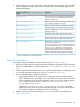
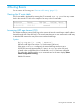
Router Pim configuration
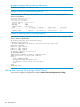
These steps configure the PIM-SM in the Router PIM context (HP Switch (pim)#_).
1. Specify the VLAN interface to advertise as the BSR Candidate and enable the router to advertise
itself as a candidate BSR in a PIM-SM domain. (Use bsr-candidate source-ip-vlan
vid.)
2. Option: To make NSR candidate selection occur quickly and predictably, set a different priority
on each BSR candidate in the domain. (Use bsr-candidate priority.)
3. Do one of the following to configure RP operation:
• Recommended: Enable C-RP operation and configure the router to advertise itself as a
C-RP to the BSR for the current domain. This step includes the option to allow the C-RP to
be a candidate for either all possible multicast groups or for up to four multicast groups
and/or ranges of groups. (Use rp-candidate source-ip-vlan vid
[group-addr/group-mask].)
• Option: Use rp-address ip-addr [group-addr/group-mask] to statically
configure the router as the RP for a specific multicast group or range of multicast groups.
(This must be configured on all RIM-SM routers in the domain.)
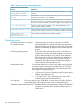
4. Option: In the PIM router context, change one or more of the traffic control settings. See
Table 7 (page 104).
Configuration steps for PIM-SM 103