
Multicast and Routing Guide K/KA/KB.15.15
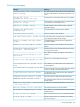
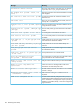
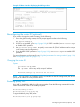

Example 59 Menu interface displaying the ARP age value
Reconfiguring the router ID (optional)
If you want to change the router ID setting, do the following:
1. Go to the global config context; the CLI prompt appears similar to the following:
HP Switch(config)#_
2. If OSPF is not enabled, go to step 3 (page 109); if OSPF is enabled, use no router ospf
to disable OSPF operation.
3. Use ip router-id ip-addr to specify a new router ID. (This IP address must be unique
in the routing switch configuration.)
4. If you disabled OSPF operation in step 2 (page 109), use router ospf to re-enable OSPF
operation.
For more information on the router ID, see “IP global parameters for routing switches” (page 114)
and “Changing the router ID” (page 117).
Changing the router ID
Syntax:
ip router-id ip-addr
The ip-addr can be any valid, unique IP address.
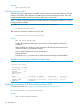
HP Switch(config)# ip router-id 209.157.22.26
NOTE: You can specify an IP address used for an interface on the HP routing switch, but do not
specify an IP address in use by another device.
Enabling proxy ARP
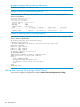
Proxy ARP is disabled by default on HP routing switches. Enter the following commands from the
VLAN context level in the CLI to enable proxy ARP:
HP Switch(config)# vlan 1
HP Switch(vlan-1)# ip proxy-arp
To again disable IP proxy ARP, enter:
HP Switch(vlan-1)# no ip proxy-arp
Reconfiguring the router ID (optional) 109