
Multicast and Routing Guide K/KA/KB.15.15
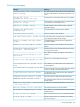
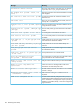

Syntax:
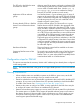
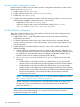
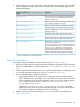
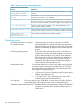
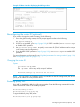
[no] ip proxy-arp
Enabling local proxy ARP
When the local proxy ARP option is enabled, a switch responds with its MAC address to all ARP
request on the VLAN. All IP packets are routed through and forwarded by the switch. The switch
prevents broadcast ARP requests from reaching other ports on the VLAN.
NOTE: Internet control message protocol (ICMP) redirects are disabled on interfaces on which
local proxy ARP is enabled.
To enable local proxy ARP, you must first enter VLAN context, for example:
HP Switch(config) vlan 1
Then enter the command to enable local proxy ARP:
HP Switch(vlan-1)ip local-proxy-arp
Syntax:
[no] ip local-proxy-arp
Enables the local proxy ARP option. You must be in VLAN context to execute this
command.
When enabled on a VLAN, the switch responds to all ARP requests received on the
VLAN ports with its own hardware address.
The no option disables the local proxy ARP option.
Default: Disabled
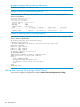
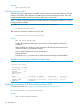
Execute the show ip command to see which VLANs have local proxy ARP enabled.
Example 60 Local proxy ARP is enabled on the default VLAN
HP Switch(vlan-1)# show ip
Internet (IP) Service
IP Routing : Disabled
Default TTL : 64
Arp Age : 20
Domain Suffix :
DNS server :
VLAN | IP Config IP Address Subnet Mask Proxy ARP
-------------------- + ---------- --------------- --------------- ---------
DEFAULT_VLAN | DHCP/Bootp 15.255.157.54 255.255.248.0 Yes Yes
VLAN2100 | Disabled
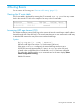
Enabling forwarding of IP directed broadcasts (CLI)
For more information, see “Configuring forwarding parameters” (page 120).
HP Switch(config)# ip directed-broadcast
Syntax:
[no] ip directed-broadcast
110 Routing Basics