
Multicast and Routing Guide K/KA/KB.15.15
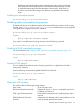
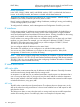
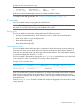
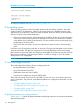
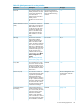
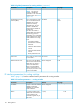
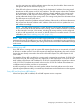

Table 9 IP interface parameters — routing switches (continued)
See pageDefaultDescriptionParameter
A-159DisabledLocally overrides the global
IRDP settings.
ICMP Router Discovery
Protocol (IRDP)
A-164None configuredThe IP address of a UDP
application server (such as
IP helper address
a BootP or DHCP server) or
a directed broadcast
address. IP helper addresses
allow the routing switch to
forward requests for certain
UDP applications from a
client on one subnet to a
server on another subnet.
1
See the Management and Configuration Guide for your switch.
Configuring IP parameters for routing switches
The following sections describe how to configure IP parameters. Some parameters can be configured
globally and overridden for individual VLAN interfaces. Other parameters can be configured on
individual VLAN interfaces.
NOTE: For IP configuration information when routing is not enabled, see the Management and
Configuration Guide for your switch.
Configuring IP addresses
You can configure IP addresses on the routing switch's VLAN interfaces. For more information, see
the Management and Configuration Guide for your switch.
Changing the router ID
In most configurations, a routing switch has multiple IP addresses, usually configured on different
VLAN interfaces. As a result, a routing switch's identity to other devices varies depending on the
interface to which the other device is attached. Some routing protocols, including OSPF, identify
a routing switch by just one of the IP addresses configured on the routing switch, regardless of the
interfaces that connect the routing switches. This IP address is the router ID.
NOTE: RIP does not use the router ID.
If no router ID is configured, then, by default, the router ID on an HP routing switch is the first IP
address that becomes physically active at reboot. This is usually the lowest numbered IP interface
configured on the device. However, if no router ID is configured, and one or more user-configured
loopback interfaces are detected at reboot, the lowest-numbered (user-configured) loopback interface
becomes the router ID. If the lowest-numbered loopback interface has multiple IP addresses, the
lowest of these addresses will be selected as the router ID. Once a router ID is selected, it does
not automatically change unless a higher-priority interface is configured on the routing switch and
OSPF is restarted with a reboot. (User-configured loopback interfaces are always higher priority
than other configured interfaces.) However, you can explicitly set the router ID to any valid IP
address, as long as the IP address is not in use on another device in the network.
NOTE: To display the router ID, enter the show ip ospf CLI command at any Manager EXEC
CLI level.
Configuring IP parameters for routing switches 117