
Multicast and Routing Guide K/KA/KB.15.15

Example
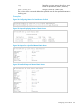
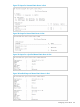
Example 65 Enter RIP router context
HP Switch(config)# router rip
HP Switch(rip)#
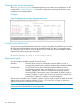
Example 66 Enable RIP routing
HP Switch(config)# router rip enable
HP Switch(rip)#
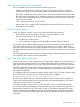
Example 67 Disable RIP routing
HP Switch(config)# router rip disable
HP Switch(rip)#
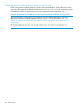
Example 68 Delete all protocol-specific information from the global context and interface context
and set all protocol parameters to default values
HP Switch(config)# no router rip
HP Switch(rip)#
Enabling IP RIP on a VLAN
To enable RIP on all IP addresses in a VLAN, use ip rip in the VLAN context. When the command
is entered without specifying any IP address, it is enabled in all configured IP addresses of the
VLAN.
To enable RIP on a specific IP address in a VLAN, use ip rip [ ip-addr | all] in the VLAN
context and enter a specific IP address. If you want RIP enabled on all IP addresses, you can specify
all in the command instead of a specific IP address.
Configuring a RIP authentication key
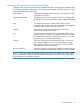
Configures a RIP authentication key. There is a maximum of 16 characters.
Syntax:
[no] ip rip [ip-addr]
authentication-key key-string
NOTE: For the 5400zl and 8200zl switches, when the switch is in enhanced
secure mode, commands that take a secret key as a parameter have the echo of
the secret typing replaced with asterisks. The input for key-string is prompted
for interactively. For more information, see the Access Security Guide for your
switch.
Changing the RIP type on a VLAN interface
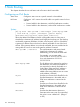
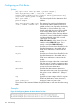
When you enable RIP on a VLAN interface, RIPv2-only is enabled by default. You can change the
RIP type to one of the following on an individual VLAN interface basis:
• Version 1 only
• Version 2 only (the default)
• Version 1 - or - version 2
Syntax:
[no] ip rip [ v1-only | v1-or-v2 | v2-only ]
130 Routing Information Protocol