
Multicast and Routing Guide K/KA/KB.15.15

Syntax:
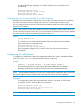
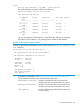
show ip rip interface [ ip-addr | vlan vlan-id ]
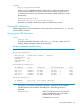
The resulting display will appear similar to the following:
HP Switch(config)# show ip rip interface
RIP interface information
IP Address Status Send mode Recv mode Metric
Auth
--------------- ----------- ---------------- ----------
----------- ----
100.1.0.1 enabled V2-only V2-only 1
none
100.2.0.1 enabled V2-only V2-only 1
none
100.3.0.1 enabled V2-only V2-only 1
none
100.4.0.1 enabled V2-only V2-only 1
none
You can also display the information for a single RIP VLAN interface, by specifying
the VLAN ID for the interface, or by specifying the IP address for the interface.
Example 70 RIP interface output by VLAN
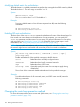
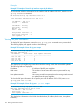
To show the RIP interface information for VLAN 1000, use the show ip rip interface vlan
vid command.
HP Switch# show ip rip interface vlan 4
RIP configuration and statistics for VLAN 4
RIP interface information for 100.4.0.1
IP Address : 100.4.0.1
Status : enabled
Send Mode : V2-only
Recv mode : V2-only
Metric : 1
Auth : none
Bad packets received : 0
Bad routes received : 0
Sent updates : 0
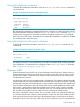
For definitions of the fields in, see “Viewing general RIP information” (page 133).
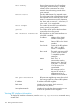
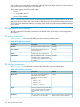
The RIP interface information also includes the following fields:
Bad packets received Number of packets that were received on this
interface and were not processed for any reason.
Bad routes received Number of route entries that were received on this
interface and were not processed for any reason.
Sent updates Number of RIP routing updates that have been sent
on this interface.
Viewing RIP information 135