
Multicast and Routing Guide K/KA/KB.15.15
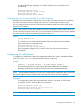
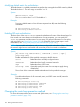
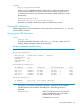
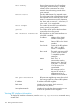

Example:
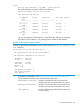
Example 71 Example of show IP rip interface output by IP address
To show the RIP interface information for the interface with IP address 100.2.0.1, enter the show
ip rip interface command:
HP Switch# show ip rip interface 100.2.0.1
RIP interface information for 100.2.0.1
IP Address : 100.2.0.1
Status : enabled
Send Mode : V2-only
Recv mode : V2-only
Metric : 1
Auth : none
Bad packets received : 0
Bad routes received : 0
Sent updates : 0
Viewing RIP peer information
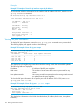
To display RIP peer information, enter the show ip rip peer command at any context level.
The resulting display will appear similar to the following:
Example 72 Example of show IP rip peer output
HP Switch# show ip rip peer
RIP peer information
IP Address Bad routes Last update timeticks
--------------- ----------- ---------------------
100.1.0.100 0 1
100.2.0.100 0 0
100.3.0.100 0 2
100.10.0.100 0 1
This display lists all neighboring routers from which the routing switch has received RIP updates.
The following fields are displayed:
IP address IP address of the RIP peer neighbor.
Bad routes The number of route entries that were not processed for any
reason.
Last update timeticks How many seconds have passed since the routing switch received
an update from this peer neighbor.
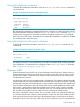
To show the RIP peer information for a specific peer with IP address 100.1.0.100, enter show
ip rip peer 100.1.0.100.
Example 73 Example of show IP rip peer ip-addr output
HP Switch# show ip rip peer 100.0.1.100
RIP peer information for 100.0.1.100
IP Address : 100.1.0.100
Bad routes : 0
Last update timeticks : 2
This display lists information in the fields described above (IP address, Bad routes, Last update
timeticks.)
136 Routing Information Protocol