
Multicast and Routing Guide K/KA/KB.15.15
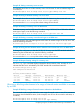
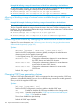
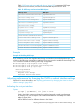
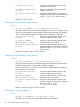
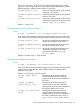
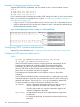

Table “OSPF traps and associated MIB objects” (page 155) summarizes OSPF traps
supported on the switches, and their associated MIB objects from RFC 1850.
Table 12 OSPF traps and associated MIB objects
MIB objectOSPF trap name
ospflfAuthFailureinterface-authentication-failure
ospflfConfigErrorinterface-config-error
ospflfrxBadPacketinterface-receive-bad-packet
ospfTxRetransmitinterface-retransmit-packet
-interface-state-change
ospfNbrStateChangeneighbor-state-change
ospfOriginateLsaoriginate-lsa
ospfMaxAgeLsaoriginate-maxage-lsa
-virtual-interface-authentication-failure
ospfVirtlfConfigErrorvirtual-interface-config-error
ospfVirtlfStateChangevirtual-interface-state-change
ospfVirtNbrStateChangevirtual-neighbor-state-change
ospfVirtlfRxBad Packetvirtual-interface-receive-bad-packet
ospfVirtlfTxRetransmitvirtual-interface-retransmit-packet
Example
Example 90 Enabling OSPF traps
If you wanted to monitor the neighbor-state-change and interface-receive-bad-packet traps, you
would use the following commands to configure the routing switch to enable the desired trap. The
show command verifies the resulting OSPF trap configuration.
HP Switch(ospf)# trap neighbor-state-change
HP Switch(ospf)# trap interface-receive-bad-packet
HP Switch(ospf)# show ip ospf traps
OSPF Traps Enabled
==================
Neighbor State Change
Interface Receive Bad Packet
Adjusting performance by changing the VLAN or subnet interface settings
Optional: For more information, see “Adjusting performance by changing the VLAN or subnet
interface settings” (page 202).
Indicating the cost per-interface
Syntax:
ip ospf [ ip-address | all ] cost 1-65535
Used in the VLAN context to indicate the overhead required to send a packet across
an interface. You can modify the cost to differentiate between 100 Mbps and 1000
Mbps (1 Gbps) links.
Allows different costs for different subnets in the VLAN.
Adjusting performance by changing the VLAN or subnet interface settings 155