
Multicast and Routing Guide K/KA/KB.15.15
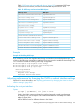
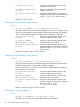

Use show ip ospf interface ip-address to view the current authentication
setting.
NOTE: To replace the password method with the MD5 method on a given
interface, overwrite the password configuration by using the MD5 form of the
command shown in the next syntax description. (It is not necessary to disable the
currently configured OSPF password.)
Default: Disabled
Configuring OSPF MD5 authentication
Syntax:
ip ospf md5-auth-key-chain chainname-string
no ip ospf [ip-address] authentication
Used in the VLAN interface context to configure MD5 authentication for all interfaces
in the VLAN or for a specific subnet. The MD5 authentication takes effect
immediately, and all OSPF packets transmitted on the interface contain the
designated key. All OSPF packets received on the interface are also checked for
the key. If it is not present, the packet is dropped.
To disable MD5 authentication on an interface, use the no form of the command.
NOTE: Before using this authentication option, you must configure one or more
key chains on the routing switch by using the Key Management System (KMS). See
the Access Security Guide for your switch.
Default: Disabled
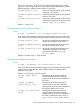
ip-address Used in subnetted VLAN contexts where you want to
assign or remove MD5 authentication associated with
a specific subnet.
Omit this option when you want the command to apply
to all interfaces configured in the VLAN.
chain-name-string The name of a key generated using the key-chain
chain_name key key_id.
To change the MD5 authentication configured on an
interface, re-execute the command with the new MD5
key.
Use show ip ospf interface ip-address to view the current authentication setting.
NOTE: To replace the MD5 method with the password method on a given interface, overwrite
the MD5 configuration by using the password form of the command shown in the next syntax
description. (It is not necessary to disable the currently configured OSPF MD5 authentication.)
Default: Disabled
Configuring a virtual link
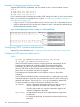
For information about virtual links, see “Configuring an ABR to use a virtual link to the backbone”
(page 202).
Syntax:
ip ospf area area-id virtual linkip-address
Configuring a virtual link 159