
Multicast and Routing Guide K/KA/KB.15.15
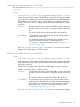
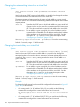
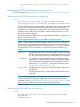

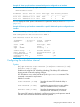

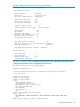
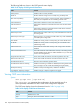

The following fields are shown in the OSPF general status display:
Table 13 CLI display of OSPF general information
ContentField
Whether OSPF is currently enabled.OSPF protocol
Router ID that this routing switch is currently using to identify itself.Router ID
Whether the routing switch is currently using RFC 1583 (compatible) or
RFC 2328 (non-compatible rules for calculating external routes.
RFC 1583 compatibility
Administrative distance for routes within OSPF areas.Intra-area distance
Administrative distance for routes between areas within the same OSPF
domain.
Inter-area distance
Administrative distance for routes between the OSPF domain and other,
Exterior Gateway Protocol domains.
AS-external
Default metric that will be used for any routes redistributed into OSPF by
this routing switch
Default import metric
Metric type (type 1 or type 2) that will be used for any routes redistributed
into OSPF by this routing switch.
Default import metric type
Whether this routing switch is currently acting as an area border router.Area Border
Whether this routing switch is currently acting as an AS border router
(redistributing routes.)
AS Border
Total number of external LSAs currently in the routing switch's link state
database.
External LSA Count
Sum of the checksums of all external LSAs currently in the routing switch's
link state database (quick check for whether database is in sync with other
routers in the routing domain.)
External LSA Checksum Sum
Count of the number of times this switch has originated a new LSA.Originate New LSA Count
Count of the number of times this switch has received a new LSA.Receive New LSA Count
Maximum seconds between graceful restarts.Graceful Restart Interval
Whether LSA checking is enabled or disabled (terminates graceful restart
when a change to an LSA would cause flooding during the restart.)
Graceful Restart Strict-Lsa Checking
Whether nonstop forwarding (NSF) is enabled or disabled.Nonstop forwarding
Whether changes in adjacent neighbors are logged.Log Neighbor Adjacency Changes
Viewing OSPF area information
Syntax:
show ip ospf area [ ospf-area-id]
The [ospf-area-id] parameter shows information for the specified area. If no
area is specified, information for all the OSPF areas configured is displayed.
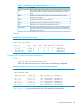
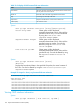
The OSPF area display shows the information found in Table 14 (page 168):
Table 14 CLI display of OSPF area information
ContentField
Identifier for this area.Area ID
Area type, which can be either "normal" or "stub".Type
168 Open Shortest Path First Protocol (OSPF)