
Multicast and Routing Guide K/KA/KB.15.15
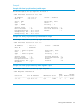
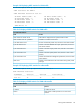
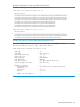

Example 103 show ip ospf neighbor detail
HP-E5406zl(vlan-1)# show ip ospf neighbor detail
OSPF Neighbor Information for neighbor 10.2.1.2
IP Address : 10.2.1.2
Router ID : 2.2.2.2 State : FULL
Interface : vlan-1 Designated Router : n/a
Area : backbone Backup Designated Router : n/a
Priority : n/a Retransmit Queue Length : 0
Options : 0x42 Neighbor Uptime : 0h:0m:14s
Events : 7 Dead Timer Expires : 35 sec
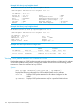
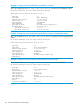
Example 104 Show ip ospf neighbor detail
HP-E5406zl(vlan-1)# show ip ospf neighbor 10.2.1.2
OSPF Neighbor Information for neighbor 10.2.1.2
IP Address : 10.2.1.2
Router ID : 2.2.2.2 Pri : n/a
NbIfState : n/a State : FULL
Rxmt QLen : 0 Events : 7
Helper Status : None Helper Age : 0
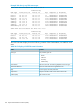
Example 105 show ospf interface configuration
Admin Authen
IP Address Area ID Status Type Type Cost Pri
--------------- --------------- -------- -------- ------ ----- ---
172.16.30.186 backbone enabled Pt-to-Pt none 100 n/a
.
Viewing OSPF packet statistics for a subnet or VLAN
Displays the statistics on OSPF packets sent and received on the interfaces in VLANs and/or subnets
on an OSPF-enabled routing switch, including the number of errors that occurred during packet
transmission. Enter the command at any CLI level.
Syntax:
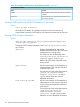
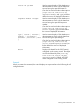
show ip ospf interface [[vlan vlan-id] | ip-address ]
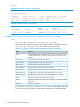
Displays the following information for OSPF-enabled VLANs and/or subnets:
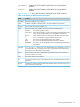
vlan-id Displays OSPF packet statistics for all subnets configured on the
VLAN.
ip-address Displays OSPF packet statistics only for a specified VLAN subnet.
174 Open Shortest Path First Protocol (OSPF)