
Multicast and Routing Guide K/KA/KB.15.15
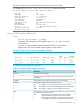
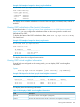
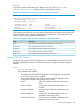
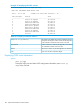
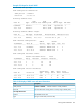
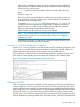
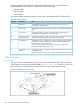

Example 122 Output for show IP OSPF
HP Switch# show ip ospf
OSPF Configuration Information
OSPF protocol : enabled
Router ID : 10.0.8.35
Currently defined areas:
Stub Stub Stub
Area ID Type Default Cost Summary LSA Metric Type SPF Runs
-------------- ------ ------------ ------------ ------------- --------
backbone normal 1 don't send ospf metric 1
10.3.16.0 normal 1 don't send ospf metric 1
10.3.32.0 normal 1 don't send ospf metric 1
Currently defined address ranges:
Area ID LSA Type IP Network Network Mask Advertise Cost
-------------- --------- ------------- -------------- --------- ----
10.3.16.0 Summary 10.3.16.0 255.255.255.0 yes 1
OSPF interface configuration:
Admin Authen
IP Address Area ID Status Type Type Cost Pri
--------------- --------------- -------- ----- ------ ----- ---
10.3.2.35 backbone enabled BCAST none 1 1
10.3.3.35 backbone enabled BCAST none 1 1
10.3.16.35 10.3.16.0 enabled BCAST none 1 1
10.3.32.35 10.3.32.0 enabled BCAST none 1 1
OSPF configured interface timers:
Transit Retransmit Hello Dead
IP Address Delay Interval Interval Interval
-------------- ------- ---------- --------- ----------
10.3.2.35 1 5 10 40
10.3.3.35 1 5 10 40
10.3.16.35 1 5 10 40
10.3.32.35 1 5 10 40
OSPF configured virtual interfaces:
Authen Xmit Rxmt Hello Dead
Area ID Router ID Type Delay Intvl Intvl Interval
--------------- --------------- ------ ------ ------ ------ ----------
10.3.16.0 10.0.8.33 none 1 5 10 40
10.3.16.0 10.0.8.36 none 1 5 10 40
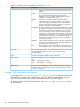
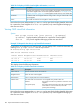
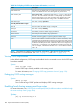
Table 26 CLI display of OSPF route and status information
DescriptionField
enabled or disabled — indicates if OSPF is currently enabled.OSPF protocol
The router ID that this routing switch is currently using to identify itself.Router ID
Currently defined areas:
The identifier for this area.Area ID
The type of OSPF area (normal or stub.)Type
Viewing OSPF information 187