
Multicast and Routing Guide K/KA/KB.15.15
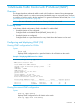

You can also combine the ip igmp command with other IGMP-related commands, as described
in the following sections.
Configuring per-port IGMP traffic filters
Syntax:
vlan vid ip igmp [ auto port-list | blocked port-list |
forward port-list ]
Used in the VLAN context, specifies how each port should handle IGMP traffic.
Default: auto.
NOTE: Where a static multicast filter is configured on a port, and an IGMP filter
created by this command applies to the same port, the IGMP filter overrides the
static multicast filter for any inbound multicast traffic carrying the same multicast
address as is configured in the static filter. For more information, see the
Management and Configuration Guide for your switch.
Example:
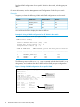
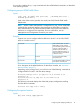
Suppose you want to configure IGMP as follows for VLAN 1 on the 100/1000T
ports on a module in slot 1:
Filter multicast traffic. Forward
IGMP traffic to hosts on these
autoPorts A1-A2
ports that belong to the multicast
group for which the traffic is
intended. (Also forward any
multicast traffic through any of
these ports that is connected to
a multicast router.)
Forward all multicast traffic
through this port.
forwardPorts A3-A4
Drop all multicast traffic received
from devices on these ports.
blockedPorts A5-A6
For a description of the default behavior of data-driven switches, see “Automatic
fast-leave IGMP” (page 27).
Depending on the privilege level, you could use one of the following commands to
configure IGMP on VLAN 1 with the above settings:
HP Switch(config)# vlan 1 ip igmp auto a1,a2 forward a3,a4
blocked a5,a6
HP Switch(vlan-1)# ip igmp auto a1,a2 forward a3,a4
blocked a5,a6
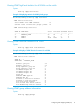
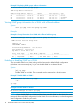
The following command displays the VLAN and per-port configuration resulting
from the above commands.
HP Switch show igmp vlan 1 config
Configuring the querier function
Syntax:
[no] vlan vid ip igmp querier
Configuring and displaying IGMP (CLI) 19