
Multicast and Routing Guide K/KA/KB.15.15

Algorithm for AS external LSA reduction
The AS external LSA reduction feature behavior changes under the following conditions:
• There is one ASBR advertising (originating) a route to the external destination, but one of the
following happens:
• A second ASBR comes on-line.
• A second ASBR that is already on-line begins advertising an equivalent route to the same
destination.
In either of these cases, the HP switch with the higher router ID floods the AS external
LSAs and the other HP switch flushes its equivalent AS external LSAs.
• One of the ASBRs starts advertising a route that is no longer equivalent to the route the other
ASBR is advertising. In this case, the ASBRs each flood AS external LSAs. Since the LSAs either
no longer have the same cost or no longer have the same next-hop router, the LSAs are no
longer equivalent, and the LSA reduction feature no longer applies.
• The ASBR with the higher router ID becomes unavailable or is reconfigured so that it is no
longer an ASBR. In this case, the other ASBR floods the AS external LSAs.
Replacing type-3summary LSAs and type-7 default external LSAs with a type-3 default
route LSA
By default, a routing switch operating as an ABR for a stub area or NSSA injects non-default,
summary routes (LSA type 3) into the stub areas and NSSAs. For NSSAs, the routing switch also
injects a type-7 default external route. You can further reduce LSA traffic into these areas by using
no-summary.This command option configures the routing switch to:
• Replace type-3 summary LSA injection into a stub area or NSSA with a type-3 default summary
route (0.0.0.0/0.)
• Disable injection of the type-7 default external route into an NSSA.
You can enable this behavior when you first configure the stub area or NSSA, or at a later time.
For the full command to use, see “Configuring a stub or NSSA area” (page 143).
The no-summary command does not affect intra-area advertisements, meaning the switch still
accepts summary LSAs from OSPF neighbors within its area and floods them to other neighbors.
The switch can form adjacencies with other routers regardless of whether summarization is enabled
or disabled for areas on each switch.
When you use no-summary, the change takes effect immediately. If you apply the option to a
previously configured area, the switch flushes all of the summary LSAs it has generated (as an ABR)
from the area.
NOTE: This feature applies only when the switch is configured as an ABR for a stub area or
NSSA. To completely prevent summary LSAs from injection into the area, use no-summary to
disable the summary LSAs on each OSPF router that is an ABR for the area.
To implement the above operation for a stub area or NSSA, enter a command such as the following:
HP Switch(ospf)# area 40 stub 3 no-summary
Equal cost multi-path routing (ECMP)
The ECMP feature allows OSPF to add routes with multiple next-hop addresses and with equal
costs to a given destination in the forwarding information base (FIB) on the routing switch. For
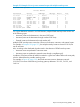
example, if you display the IP route table by entering the show ip route command, multiple
next-hop routers are listed for the same destination network (21.0.9.0/24) as shown in Example 123
(page 197).
196 Open Shortest Path First Protocol (OSPF)