
Multicast and Routing Guide K/KA/KB.15.15
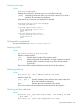
If the prefix list does not contain an entry with that
sequence number, no description is entered.
If you do not specify a sequence number, the
description is attached to the first entry in the prefix
list at the time the description is entered.
description-string Specifies a description string of up to 80 characters.
If you delete the entry to which the description is attached, the description is deleted
also.
Viewing prefix lists
The show ip prefix-list command displays the content of prefix lists.
Syntax:
show [ ip | ipv6 prefix-list ] [name list-name] [ summary |
detail ]
Displays the content of prefix lists.
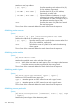
[ ip | ipv6 ] Specifies an IPv4 (IP) or IPv6 prefix list.
name list-name Specifies the name of the prefix list to display. If
this parameter is omitted, all prefix lists are
displayed.
[ summary | detail ] If neither summary nor detail is specified, the
listing displays the name of the prefix list and each
entry in the list (not including descriptions.)
If summary is specified, the listing displays the
name of the list and a summary of the entries (but
not the entries themselves.)
If detail is specified, the listing displays the
summary information, the description (if it exists),
and the entries in the list.
Example
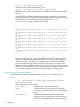
In a switch that contains two prefix lists, a standard display looks like this:
HP Switch# show ip prefix-list
ip prefix-list Odd: 4 entries
seq 5 permit 10.1.1.1/24 ge 24 le 24
seq 10 deny 10.1.2.1/24 ge 24 le 24
seq 15 permit 10.1.3.1/24 ge 24 le 24
seq 20 deny 10.1.4.1/24 ge 24 le 24
ip prefix-list Even: 4 entries
seq 5 deny 10.1.1.1/24 ge 24 le 24
seq 10 permit 10.1.2.1/24 ge 24 le 24
seq 15 deny 10.1.3.1/24 ge 24 le 24
seq 20 permit 10.1.4.1/24 ge 24 le 24
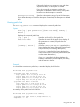
A summary of the prefix lists looks like this:
HP Switch# show ip prefix-list summary
ip prefix-list Odd: Count:4, Range-entries: 4,
Sequences: 5 - 20
Using prefix lists 207