
Multicast and Routing Guide K/KA/KB.15.15

Syntax:
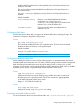
[no] igmp filter-unknown-mcast
Enables interface isolation for unjoined multicast groups. IGMP is configured so
that each interface with IGMP enabled will have a data-driven multicast filter
associated with it, preventing unjoined IP multicast packets from being flooded. A
reboot is required for the change to take effect.
Default: Disabled
Configuring IGMP proxy (CLI)
For more information on IGMP proxy, see “IGMP general operation and features” (page 24).
Adding or leaving a multicast domain
Syntax:
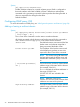
[no] igmp-proxy-domain domain-name [ border-router-ip-address
| mcast-range | all ]
The no form of the command is used to remove a multicast domain.
All VLANs associated with the domain must first be removed for this command to
work. See the no form of igmp-proxy in the VLAN context command.
domain-name User-defined name to associate with the PIM
border router and multicast range that is
being sent toward the border router.
border-router-ip-addr The IP address of the border router toward
which IGMP proxy packets are sent. Not
required for the no form of the command.
NOTE: The current routing FIB determines
the best path toward the border router and
therefore the VLAN that a proxy is sent out
on
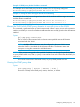
[ low-bound-ip-address |
all ]
The low boundary (inclusive) of the multicast
address range to associate with this domain
(for example, 234.0.0.1.)
If all is selected, the multicast addresses in
the range of 224.0.1.0 to
239.255.255.255 are included in this
domain.
NOTE: Addresses 224.0.0.0 to
224.0.0.255 are never used, because these
addresses are reserved for protocols.
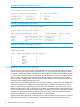
high-bound-ip-address The high boundary (inclusive) of the multicast
address range to associate with this domain
(for example, 236.1.1.1.)
22 Multimedia Traffic Control with IP Multicast (IGMP)