
Multicast and Routing Guide K/KA/KB.15.15
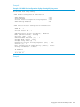
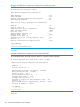
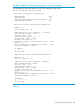
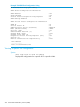
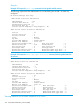

Example 144 VRRP IPv6 configuration display showing VIP ping status
HP Switch# show vrrp ipv6 config
VRRP Global Configuration Information
VRRP Enabled : Yes
Traps Enabled : Yes
Virtual Routers Respond To Ping Requests : No
VRRP Nonstop Enabled : No
VRRP Virtual Router Configuration Information
VLAN ID : 10
Virtual Router ID : 10
Administrative Status [Disabled] : Enabled
Mode [Uninitialized] : Owner
Priority [100] : 255
Advertisement Interval [1] : 1
Preempt Mode [True] : True
Preempt Delay Time [0] : 0
Respond To Virtual IP Ping Requests [Yes] : Yes
Version [2] : 3
RFC2338 authentication compatibility : True
IPv6 Address
-------------
fe80::216:b9ff:fed1:5280
Example
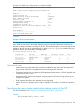
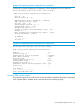
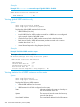
Example 145 VRRP IPv4 configuration for a VLAN and VRID
This example displays the ping response status for a specific VLAN and VRID.
HP Switch(config)# show vrrp vlan 2 vrid 1 config
VRRP Virtual Router Configuration Information
VLAN ID : 2
Virtual Router ID : 1
Administrative Status [Disabled] : Enabled
Mode [Uninitialized] : backup
Priority [100] : 150
Advertisement Interval [1] : 1
Preempt Mode [True] : True
Preempt Delay Time [0] : 0
Respond To Virtual IP Ping Requests [Yes] : Yes
Version [2] : 2
Null authentication compatibility [False] : False
Primary IP Address : Lowest
IP Address
---------------
10.0.202.87
Example
262 Virtual Router Redundancy Protocol (VRRP)