
Multicast and Routing Guide K/KA/KB.15.15
a. On another router with an interface in the same network or subnet as is the owner
configured in step “1” (page 280), enter the global configuration context and enable VRRP:
router vrrp ipv4 enableor router vrrp ipv6 enable
b. Configure (and enter) the same VR instance as was configured for the owner in step
“1” (page 280):
vlan vid
vrrp vrid 1 - 255 (for IPv4)
vrrp ipv6 vrid 1-255 (for IPv6)
c. Optional: If there is only one backup router, or if you want the priority among backups
to be determined by the lowest IP address among the backups, leave the VR instance
priority for the current backup router at the default of 100. (Applies only to the "real" IP
addresses that are part of this VR—there may be other addresses on the routers that are
lower—but only the interfaces participating in the VR are part of this determination.) If
you want to control backup router priority by creating a numeric hierarchy among the
backup routers in the VR, set the priority on each accordingly:
priority 1 - 254
d. Configure the VIP for the current VR. Use the same address as you used for the owner
router's instance of the VR.
virtual-ip-address ipaddr
e. Activate the backup VR instance:
enable
f. Inspect the configuration for the owner VR:
show vrrp vlan vid vrid vrid-# config
show vrrp ipv6 vlan vid vrid vrid-# config (for IPv6)
Leave the advertisement interval for backup routers at the default (1 second).
3. Repeat step 2 for each backup router on the same VR.
Example configuration
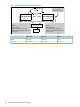
In VR 1, below, R1 is the owner and the current master router, and R2 is the (only) backup in the
VR. If R1 becomes unavailable, VR 1 fails over to R2.
Steps for provisioning VRRP operation 281