
Multicast and Routing Guide K/KA/KB.15.15

the switch automatically retains that IGMP client in its IGMP table and continues forwarding IGMP
traffic to the IGMP client until the Querier triggers confirmation that no other group members exist
on the same port. This delayed leave operation means that the switch continues to transmit
unnecessary multicast traffic through the port until the Querier renews multicast group status.
Forced fast-leave IGMP
When enabled, forced fast-leave IGMP speeds up the process of blocking unnecessary IGMP traffic
to a switch port that is connect ed to multiple end nodes. (This feature does not activate on ports
where the switch detects only one end node.) For example, in Figure 2 (page 28), even if you
configured forced fast-leave on all ports in the switch, the feature would activate only on port A6
(which has multiple end nodes) when a Leave Group request arrived on that port.
When a port having multiple end nodes receives a Leave Group request from one end node for
a given multicast group "X," forced fast-leave activates and waits a small amount of time to receive
a join request from any other group "X" member on that port. If the port does not receive a join
request for that group within the forced-leave interval, the switch then blocks any further group "X"
traffic to the port.
Fast learn
The fast learn option allows fast convergence of multicast traffic after a topology change.
This command is executed in the global config context.
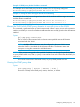
Example 15 To enable fastlearn on ports 5 and 6
HP Switch(config)# igmp fastlearn 5-6
Unjoined multicast traffic
This feature adds a global IGMP multicast configuration option to the switch that results in each
VLAN having a multicast filter. The filter prevents unjoined multicast traffic from being forwarded
on interfaces associated with IGMP queriers. Each filter only contains interfaces that are queriers
on the same VLAN, so multicast traffic is only flooded on interfaces that contain queriers that are
on the same VLAN as the multicast traffic.
On switch bootup, all VLANs that are IGMP-enabled are guaranteed one multicast filter. You can
always reboot the switch to recreate this configuration where each IGMP-enabled VLAN has a
multicast filter.
NOTE: Joined multicast traffic continues to be forwarded as usual.
You must reboot the switch after configuring the per-VLAN filter.
Example 16 Enabling the IGMP multicast filter
HP Switch(config)# igmp filter-unknown-mcast
Command will take effect after saving configuration and reboot.
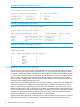
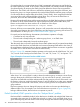
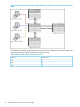
The following example shows the multicast traffic being flooded to all queriers on all VLANs; this
is the default behavior. The igmp filter-unknown-mcast command has not been executed.
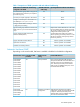
Table 2 Multicast filter table on distribution switch
Member PortsVLAN ID
1, 2, 30 (all VLANs)
How IGMP operates 29