
Multicast and Routing Guide K/KA/KB.15.15
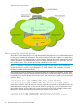
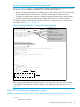

Figure 4 Example of unknown multicast traffic not flooding out ports connected to queriers in
separate VLANs
To display the status of IGMP multicast filtering use the show ip igmp command. If the IGMP
Filter Unknown Multicast setting is different from the IGMP Filter Unknown Multicast status, a reboot
is required to activate the desired setting. This setting will then be reflected in the status.
Example 17 IGMP unknown multicast filter setting being enabled but not yet activated
HP Switch(config)# show igmp filter-unknown-mcast
IGMP Filter Unknown Multicast: Enabled
IGMP Filter Unknown Multicast Status: Disabled
To display information about IGMP multicast filtering by interface, use the show ip igmp
command.
IGMP proxy forwarding
When a network has a border router connecting a PIM-SM domain to a PIM-DM domain, the
routers that are completely within the PIM-DM domain have no way to discover multicast flows in
the PIM-SM domain. When an IGMP join occurs on a router entirely within the PIM-DM domain
for a flow that originates within the PIM-SM domain, it is never forwarded to the PIM-SM domain.
The IGMP proxy is a way to propagate IGMP joins across router boundaries. The proxy triggers
the boundary router connected to a PIM-SM domain to query for multicast flows and forward them
to the PIM-DM domain. IGMP needs to be configured on all VLAN interfaces on which the proxy
is to be forwarded or received, and PIM-DM must be running for the traffic to be forwarded.
You can configure an IGMP proxy on a selected VLAN that will forward IP joins (reports) and
IGMP leaves to the upstream border router between the two multicast domains. You must specify
the VLANs on which the proxy is enabled as well as the address of the border router to which the
joins are forwarded.
How IGMP operates 31