
Multicast and Routing Guide K/KA/KB.15.15
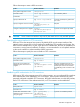
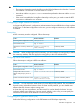
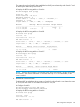

Follow these steps to create a BGP connection:
RemarksUse the command...To do...
configurationEnter global configuration context
Not enabled by defaultrouter bgp as-numberEnter BGP context
enableEnable BGP
Optional. By default, the global router
ID is used.
bgp router-id ip-addressSpecify a BGP Router ID
Requiredneighbor
{ip-address}remote-as
as-number
Specify a neighbor and its AS number
Optional. Not configured by defaultneighbor
{ip-address}description
description-text
Configure a description for a neighbor
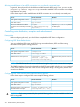
CAUTION: Since a router can reside in only one AS, the router can run only one BGP process.
Specifying the source interface for TCP connections
BGP uses TCP as the transport layer protocol. By default, BGP uses the output interface of the
optimal router to a peer as the source interface for establishing TCP connections to the peer. If a
BGP router has multiple links to a peer, when the source interface fails, BGP has to reestablish TCP
connections, causing network oscillation. Therefore, it is recommended to use a loopback interface
as the source interface to enhance stability of BGP connections.
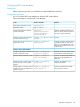
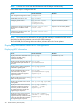
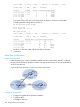
Follow these steps to specify the source interface of TCP connections:
RemarksUse the command...To do...
configurationEnter global configuration context
bgp as-numberEnter BGP context
Required. By default, BGP uses the
outbound interface of the best route to
neighbor
{ip-address}update-source
{ip-address}
Specify the source interface for
establishing TCP connections to a
neighbor. the BGP peer as the source interface
for establishing a TCP connection to the
peer.
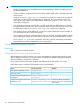
Establishing MD5 authentication for TCP connections
BGP requires TCP as the transport protocol. To enhance security, you can configure BGP to perform
MD5 authentication when establishing a TCP connection. The two parties must have the same
password configured to establish TCP connections. BGP MD5 authentication is not for BGP packets,
but for TCP connections. If the authentication fails, no TCP connection can be established.
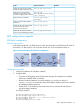
RemarksUse the command...To do...
system-viewEnter system view
bgp as-numberEnter BGP view
Optional. Not enabled by default.peer [[group-name] |
[ip-address]]
password [[cipher] |
[simple]] password
Enable MD5 authentication when
establishing a TCP connection to the
peer/peer group
BGP basic configuration 311