
Multicast and Routing Guide K/KA/KB.15.15
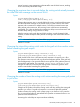
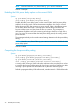
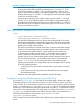
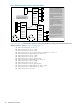
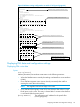
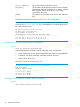
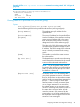
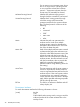
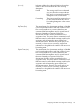
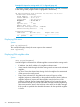

Figure 9 Multicast routing configuration on switch #1 in Figure 8 (page 44)
HP Switch(config)# show run
...
ip routing
...
vlan 29
name "VLAN29"
untagged A11-A15,A17
ip address 10.29.30.1 255.255.255.0
ip igmp
exit
vlan 25
name "VLAN25"
untagged A20-A24
ip address 10.38.10.1 255.255.255.0
ip address 10.38.11.1 255.255.255.0
ip address 10.38.12.1 255.255.255.0
ip igmp
exit
vlan 27
name "VLAN27"
untagged A6-A10,A18
ip address 10.27.30.1 255.255.255.0
ip igmp
exit
ip multicast-routing
router rip
exit
router pim
state-refresh 45
trap hardware-mrt-full
exit
vlan 25
ip rip 10.38.10.1
ip rip 10.38.11.1
ip pim-dense
ip-addr 10.38.10.1
exit
vlan 27
ip rip 10.27.30.1
ip pim-dense
ip-addr any
exit
vlan 29
ip rip 10.29.30.1
ip pim-dense
ip-addr any
Note: Dashed lines indicate configuration
settings affecting multicast routing.
Multinetting and IGMP enabled in VLAN 25.
Multicast Routing Configuration for Global Level..
Enables IP routing; required for multicast routing.
Indicates the source-IP-address for multicast packets
forwarded on this VLAN.
Multicast Routing Configuration for VLAN 25.
Multicast Routing Configurations for VLANs 27 and
Displaying PIM data and configuration settings
Displaying PIM route data
Syntax:
show ip [mroute]
Without parameters, lists multicast route entries in the following situations:
• When the PIM-DM router is actively forwarding a multicast flow out an interface
(VLAN.)
• On a PIM-DM originator router (source directly connected) when traffic is
entering the router but not forwarding
NOTE: The neighbor field will be empty in this case.
• On a PIM-DM Non-originator router for a short duration after a flow's initial
flood/prune cycle is seen. This entry is cleared after 5 minutes unless the flow
is connected within that time period.
[Group Address] The multicast group IP address for the specific flow
(source-group pair.)
Displaying PIM data and configuration settings 45