
Multicast and Routing Guide K/KA/KB.15.15
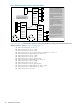
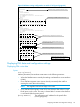
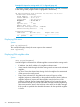

Example 22 The show ip mroute interface command on routing switch "#2" in Figure 8
(page 44)
HP Switch(config)# show ip mroute interface 29
IP Multicast Interface
VLAN : 29
Protocol : PIM-DM
TTL Threshold : 0
Viewing data for a specified flow (multicast group)
Syntax:
show ip [mroute] [multicast-ip-addr source-ip-addr]
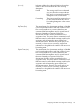
Lists the following data for the specified multicast flow (source-group pair):
[Group Address] The multicast group IP address for the
specified flow.
[Source Address] The source IP address for the specified flow.
[neighbor] Lists the IP address of the upstream next-hop
router running PIM-DM; that is, the router
from which the routing switch is receiving
datagrams for the current multicast group.
This value is 0.0.0.0 if the routing switch has
not detected the upstream next-hop router's
IP address. This field is empty if the multicast
server is directly connected to the routing
switch.
[VLAN] The interface on which the router receives
the multicast flow.
[Up Time (Sec)] The elapsed time in seconds since the routing
switch learned the information for the current
instance of the indicated multicast flow.
NOTE: On an originator router, when a
forwarding flow moves to a non-forwarding
state (i.e. when pruned) the Up Time value
for that flow is reset to 0.
[Expire Time (Sec)] An mroute which is in a forwarding state —
one which represents an active, connected
flow for which there are downstream routers
and/or locally connected hosts interested in
the flow — does not expire. When other
PIM-DM routers or locally connected hosts
are no longer interested in an active flow,
the related mroute on an originator router
moves to a blocking state, and an mroute in
this state does not expire either. In both
cases the mroute is only removed by the
system when it is no longer needed and so
the displayed value for expire time in these
situations is not meaningful.
Displaying PIM data and configuration settings 47