
Multicast and Routing Guide K/KA/KB.15.15
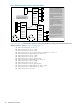
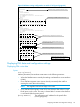
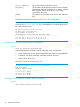
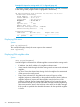

Example 23 Output for routing switch "#1" in Figure 8 (page 44)
A populated neighbor field indicates that the multicast server is directly connected
to the routing switch (neighbor field is highlighted in bold below.)
HP Switch(config)# show ip mroute 239.255.255.5 10.27.30.2
IP Multicast Route Entry
Group Address : 239.255.255.5
Source Address : 10.27.30.2
Source Mask : 255.255.255.0
Neighbor : 10.30.229.1
VLAN : 27
Up time (sec) : 408
Expire Time (sec) : 150
Multicast Routing Protocol : PIM-DM
Unicast Routing Protocol : rip
Downstream Interfaces
VLAN State Up time (sec) Expire Time (sec)
---- ---------- ------------------ -----------------
28 pruned 408 98
Displaying PIM status
Syntax:
show ip pim [mroute]
This command displays exactly the same output as the command
show ip [mroute]
.
Displaying PIM neighbor data
Syntax:
show ip pim [neighbor]
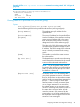
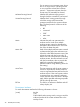
Lists PIM neighbor information for all PIM neighbors connected to the routing switch:
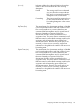
• IP Address: Lists the IP address of a neighbor multicast router.
• VLAN: Lists the VLAN through which the routing switch connects to the indicated
neighbor.
• Up Time: Shows the elapsed time during which the neighbor has maintained
a PIM route to the routing switch.
• Expire Time: Indicates how long before the router will age-out a PIM
neighbor/adjacency relationship on the specified interface (VLAN.) When a
neighbor/adjacency expires and that neighbor was the last one on the
interface, multicast data and state refresh packets will no longer be sent out
that interface. Receipt of a periodic PIM hello message from the neighboring
PIM router resets this timer to the hold time value stored in the hello message.
If the ip-addr is specified then detailed information for the specified neighbor
is shown.
50 PIM-DM (Dense Mode)