
Multicast and Routing Guide K/KA/KB.15.15
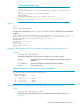
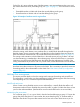
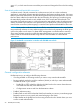
Viewing PIM-specific information from the IP multicast routing table (MRT)
Syntax:
show ip pim [mroute]
This command displays exactly the same output as the command
show ip [mroute]
.
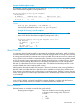
Viewing the PIM route entry information for the specified multicast group (flow)
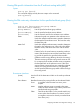
Syntax:
show ip pim [mroute[multicast-group-address
multicast-source-address]]
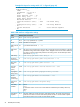
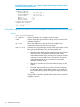
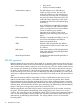
[Group Address] Lists the specified multicast group address.
[Source Address] Lists the specified multicast source address.
[Source Mask] Lists the network mask for the multicast source address.
Metric Indicates the path cost upstream to the multicast source.
Used when multiple multicast routers contend to determine
the best path to the multicast source. The lower the value,
the better the path.
Metric Pref Used when multiple multicast routers contend to determine
the path to the multicast source. When this value differs
between routers, PIM selects the router with the lowest
value.
If Metric Pref is the same between contending multicast
routers, PIM selects the router with the lowest Metric value
to provide the path for the specified multicast traffic.
(Different vendors assign differing values for this setting.)
Assert Timer The time remaining until the routing switch ceases to wait
for a response from another multicast router to negotiate
the best path back to the multicast source. If this timer
expires without a response from any contending multicast
routers, the routing switch assumes it is the best path,
and the specified multicast group traffic will flow through
the routing switch.
Downstream Interfaces
[VLAN] Lists the VID of the destination VLAN on the next-hop multicast
router.
Prune Reason Identifies the reason for pruning the flow to the indicated VLAN:
Prune A neighbor multicast router has sent a prune
request.
Assert Another multicast router connected to the same
VLAN has been elected to provide the path for the
specified multicast group traffic.
Other Used where the VLAN is in the pruned state for any
reason other than the above two reasons (such as
no neighbors exist and no directly connected hosts
have done joins.)
Displaying PIM data and configuration settings 53