
Multicast and Routing Guide K/KA/KB.15.15
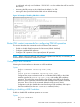
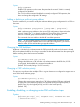
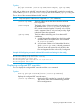

is configured with only one IP address—120-10.10.2—it is this address that will be used for
the source.)
• Increasing the DR priority on this VLAN from the default 1 to 100.
• Leaving the other per-VLAN PIM-SM fields in their default settings.
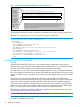
Figure 14 Example of Enabling PIM-SM in a VLAN
Router PIM context commands for configuring PIM-SM operation
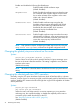
This section describes the commands used in the Router PIM context to:
• Enable or disable SNMP trap status for PIM events (default: disabled)
• Configure candidate BSR operation
• Configure C-RP operation or the (optional) static RP operation
NOTE: Before configuring BSR, RP, and SNMP trap operation for PIM-SM, it is necessary to
enable PIM-SM on at least one VLAN on the router.
Configuring a BSR candidate
Selecting the VLAN interface to advertise as a BSR candidate.
Syntax:
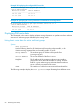
[no]bsr-candidate source-ip-vlan [vid]
[no]
router pim bsr-candidate source-ip-vlan [vid]
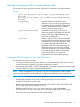
Configures the router to advertise itself as a candidate PIM-SM BSR on the VLAN
interface specified by source-ip-vlan [vid], and enables BSR candidate
operation. This makes the router eligible to be elected as the BSR for the PIM-SM
domain in which it operates. Note that one BSR candidate VLAN interface is allowed
per-router. The no form of the command deletes the BSR source IP VLAN
configuration and also disables the router from being a BSR candidate, if this option
has been enabled.(See the BSR-candidate command, below.)
Enabling or disabling a BSR Candidate
Enable or disable BSR candidate operation on a router.
Syntax:
[no] bsr-candidate
[no]
Router PIM context commands for configuring PIM-SM operation 71