
Multicast and Routing Guide K/KA/KB.15.15
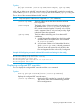

Example 39 Displaying the configured RPF overrides
HP Switch(config)# show ip pim rpf-override
Static RPF Override
Multicast Source RPF IP Address
------------------- ---------------
10.1.1.1/32 11.2.2.1
13.1.1.1/32 12.1.1.1
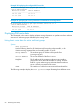
Example 40 Specifying the source parameter to troubleshoot misconfigurations
HP Switch(pim)# show ip pim rpf-override source 10.1.1.1
Static RPF Override
Multicast Source RPF IP Address
------------------- ---------------
10.1.1.1/32 11.2.2.1
Displaying PIM route data
The commands in this section display multicast routing information on packets sent from multicast
sources to IP multicast groups detected by the routing switch.
Listing basic route data for active multicast groups
Syntax:
show ip mroute
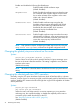
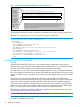
Lists the following data for all VLANs actively forwarding multicast traffic, or for
VLANs receiving registered but non-forwarding traffic on an RP.
Group Address The multicast group IP address of the specific flow
(source-group pair.)
Source Address The unicast address of the flow's source.
Neighbor The IP address of the upstream multicast router interface
(VLAN) from which the multicast traffic is coming. A blank
field for a given multicast group indicates that the multicast
server is directly connected to the router.
VLAN The interface on which the router received the multicast flow.
The following examples display the show ip mroute output illustrating three different cases:
80 PIM-SM (Sparse Mode)