
Multicast and Routing Guide K/KA/KB.15.15
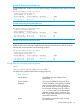
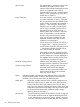
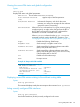
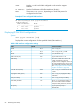
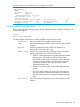
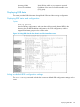

Example 44 Route entry data for a specific multicast group
The neighbor field indicates that the router is receiving multicast traffic from a neighboring PIM
router. A blank neighbor field indicates that the multicast source is directly connected to the router
instead of another PIM router.
HP Switch(config)# show ip mroute 239.255.12.42 10.0.0.10
IP Multicast Route Entry
Group Address : 239.255.12.42
Source Address : 10.0.0.10
Neighbor :
VLAN : l0
Up Time (sec) :940
Expire Time (sec) :285
Multicast Routing Protocol : PIM-SM
Unicast Routing Protocol : connected
Metric : 1
Metric Pref : 0
Assert Timer : 0
RP tree : No
Downstream Interfaces
VLAN State Up Time (sec) Expire Time (sec)
---- ---------- ----------------- ------------------
20 forwarding 940 204
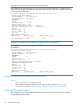
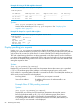
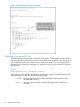
Example 45 Showing route entry data for a registered, non-forwarding flow
Blank neighbor and unicast routing protocol fields indicate the special registered, non-forwarding
RP condition.
HP Switch(config)# show ip mroute 239.255.12.42 10.0.0.10
IP Multicast Route Entry
Group Address : 239.255.12.42
Source Address : 10.0.0.10
Neighbor :
VLAN : 20
Up Time (sec) :0
Expire Time (sec) :0
Multicast Routing Protocol : PIM-SM
Unicast Routing Protocol :
Metric : 0
Metric Pref : 0
Assert Timer : 0
RP tree : No
Downstream Interfaces
VLAN State Up Time (sec) Expire Time (sec)
---- ---------- ----------------- ------------------
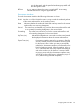
Listing all VLANs having currently active PIM flows
Syntax:
show ip mroute interface [vid]
This command displays exactly the same output as the command show ip pim
interface vid (See “Listing currently configured PIM interfaces” (page 85).)
Viewing PIM-specific data
The commands in this section display PIM-specific multicast routing information for IP multicast
groups detected by the router.
84 PIM-SM (Sparse Mode)