
Multicast and Routing Guide K/KA/KB.15.15

Viewing the current PIM status and global configuration
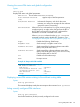
Syntax:
show ip pim
Displays PIM status and global parameters.
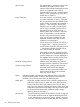
PIM Status Shows either Enabled or Disabled.
State Refresh Interval
(sec)
Applies only to PIM-DM operation.
Join/Prune Interval Indicates the frequency with which the router
transmits join and prune messages for the multicast
groups the router is forwarding.
SPT Threshold When Enabled, indicates that, for a given receiver joining
a multicast group, an edge router changes from the RPT to
the SPT after receiving the first packet of a multicast flow
intended for a receiver connected to the router.
When Disabled, indicates that the no spt-threshold
command has been used to disable SPT operation. (See
“Changing the shortest-path tree (SPT) operation” (page 76).
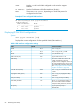
Traps Enables the following SNMP traps:
neighbor-loss Sends a trap if a neighbor router is lost.
hardware-mrt-full Sends a trap if the hardware multicast router table
(MRT) is full (2048 active flows.)
software-mrt-full: Sends a trap if the software multicast router table
(MRT) is full (2048 active flows.) This can occur only
if the hardware MRT is also full.
all Enables all of the above traps.
none No traps are set.
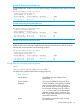
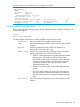
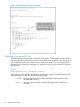
Example 46 Output with PIM enabled
HP Switch(config)# show ip pim
PIM Global Parameters
PIM Status : Enabled
State Refresh Interval (sec) : 60
Join/Prune Interval (sec) : 60
SPT Threshold : Enabled
Traps : all
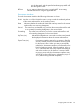
Displaying current PIM entries existing in the multicast routing table
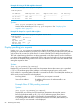
Syntax:
show ip pim mroute
This command displays exactly the same output as the command show ip mroute.
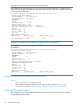
Listing currently configured PIM interfaces
Syntax:
show ip pim interface
Lists the PIM interfaces (VLANs) currently configured in the router.
Viewing PIM-specific data 85