
Multicast and Routing Guide K/KA/KB.15.15
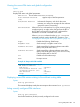

VLAN Lists the vid of each VLAN configured on the switch to support
PIM-DM.
IP Address Lists the IP addresses of the PIM interfaces (VLANs.)
Mode Shows dense or sparse, depending on which PIM protocol is
configured on the router.
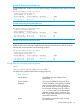
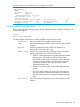
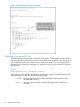
Example 47 Two configured PIM interfaces
HP Switch(config)# show ip pim interface
PIM Interfaces
VLAN IP Address Mode
---- --------------- ------------
1 10.1.10.1 sparse
2 10.2.10.1 sparse
Displaying IP PIM VLAN configurations
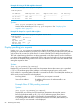
Syntax:
show ip pim interface [vid]
Displays the current configuration for the specified VLAN (PIM interface.)
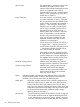
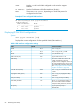
Table 6 PIM interface configuration settings
Control commandDefaultField
vlan vid ip pimN/AVLAN
vlan vid ip pim all | ip-addrN/AIP
n/a; PIM Dense onlydenseMode
ip pim hello interval 5 - 30300Hello interval (sec)
The router includes this value in the
"Hello" packets that it sends to
5Hello delay
neighbor routers. Neighbor routers use
this value to determine how long to wait
for another Hello packet from the router.
See “Changing the interval for PIM-SM
neighbor notification” (page 68).
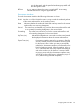
vlan vid ip pim override-interval 500
- 6000
2500override interval (msec)
vlan vid ip pim propagation-delay
250-2000
500Propagation delay (msec)
vlan vid ip pim lan-prune-delayYesLAN prune delay
Shows Yes if all multicast routers on
the current VLAN interface enabled
LAN-prune-delay. Otherwise, shows No.
NoLAN delay enabled
ip pim-sparse dr-priority 0 -
4294967295
1DR priority
86 PIM-SM (Sparse Mode)