
Access Security Guide K/KA/KB.15.15



Configures the switch to authenticate a client public key at the login level with an
optional secondary password method.
Default: none
Syntax:
aaa authentication ssh enable <local | tacacs | radius>
<local | none>
Configures a password method for the primary and secondary enable (manager)
access. If you do not specify an optional secondary method, it defaults to none.
If the primary access method is local, you can only specify none for a secondary
access method.
NOTE: The configuration of SSH clients' public keys is stored in flash memory on
the switch. You also can save SSH client public-key configurations to a configuration
file by entering the following commands:
include-credentials
write memory
For more information about saving security credentials to a configuration file, see
“Saving username and password security” (page 46).
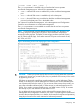
Example
Assume you have a client public-key file named Client-Keys.pub (on a TFTP server at
10.33.18.117) ready for downloading to the switch. For SSH access to the switch allow only
clients having a private key that matches a public key found in Client-Keys.pub. For
manager-level (enable) access for successful SSH clients use TACACS+ for primary password
authentication and local for secondary password authentication, with a manager username
of "1eader" and a password of "m0ns00n". To set up this operation, configure the switch in
a manner similar to the following:
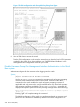
Figure 169 Configuring for SSH access requiring a client public-key match and manager
passwords
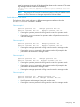
Figure 170 (page 238) shows how to check the results of the above commands.
Configuring 237