
Access Security Guide K/KA/KB.15.15
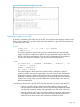
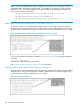
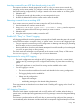
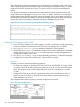
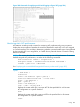
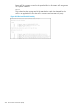
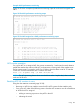
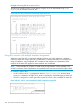

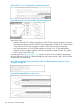

Figure 203 Viewing and resequencing an ACL
Attaching a remark to an ACE
A remark is numbered in the same way as an ACE, and uses the same sequence number as the
ACE to which it refers. This operation requires that the remark for a given ACE be entered prior
to entering the ACE itself.
Syntax:
access-list < 1 - 99 | 100 - 199 > remark
< remark-str >
This syntax appends a remark to the end of a numbered ACL and automatically
assigns a sequence number to the remark. The next command entry should be the
ACE to which the remark belongs. (The new ACE will automatically be numbered
with the same sequence number as was used for the preceding remark.)
Syntax:
ip access-list < standard | extended > < name-str | 1-99
| 100-199 > [ seq-#]
remark < remark-str >
no < seq-# > remark
This syntax applies to both named and numbered ACLs. Without an optional
sequence number, the remark is appended to the end of the list and automatically
assigned a sequence number. When entered with an optional sequence number,
the remark is inserted in the list according to the numeric precedence of the sequence
number. The no form of the command deletes the indicated remark, but does not
affect the related ACE.
To associate a remark with a specific ACE, enter the remark first, and then enter the ACE.
• Entering a remark without a sequence number and then entering an ACE
without a sequence number results in the two entries being automatically paired
with the same sequence number and appended to the end of the current ACL.
• Entering a remark with a sequence number and then entering an ACE with the
same sequence number results in the two entries being paired together and
positioned in the list according to the sequence number they share.
Using 291