
Access Security Guide K/KA/KB.15.15

remote-id
Set the value used for the remote-id field of the relay information option.
mac
The switch mac address is used for the remote-id. This is the default.
subnet-ip
The IP address of the VLAN the packet was received on is used for the
remote-id. If subnet-ip is specified but the value is not set, the MAC address
is used.
mgmt-ip
The management VLAN IP address is used as the remote-id. If mgmt-ip is
specified but the value is not set, the MAC address is used.
untrusted-policy
Configures DHCP snooping behavior when forwarding a DHCP packet from
an untrusted port that already contains DHCP relay information (Option 82).
The default is drop.
drop
The packet is dropped.
keep
The packet is forwarded without replacing the option information.
replace
The existing option is replaced with a new Option 82 generated by the
switch.
NOTE: The default drop policy should remain in effect if there are any untrusted
nodes, such as clients, directly connected to this switch.
Changing the remote-id from a MAC to an IP address
By default, DHCP snooping uses the MAC address of the switch as the remoteid in Option 82
additions. The IP address of the VLAN the packet was received on or the IP address of the
management VLAN can be used instead by entering this command with the associated parameter:
HP Switch(config)# dhcp-snooping option 82 remote-id <mac|subnet-ip|mgmt-ip>
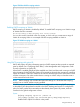
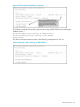
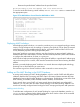
Figure 272 DHCP snooping option 82 using the VLAN IP address
Disabling the MAC address check
DHCP snooping drops DHCP packets received on untrusted ports when the check address (chaddr)
field in the DHCP header does not match the source MAC address of the packet (default behavior).
To disable this checking, use the no form of this command.
HP Switch(config)# dhcp-snooping verify mac
372 Port Security