
Access Security Guide K/KA/KB.15.15
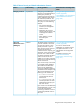
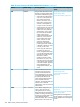
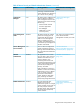
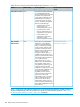
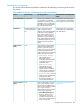
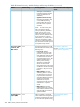
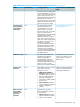
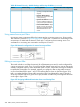


Table 48 Network Security—Default Settings and Security Guidelines (continued)
More information and configuration
details
Security guidelinesDefault settingFeature
spoofing and repeated address
requests.
• Dynamic ARP Protection:
Protects your network from ARP
cache poisoning.
• Dynamic IP Lockdown: Prevents
IP source address spoofing on
a per-port and per-VLAN basis.
• Instrumentation Monitor: Helps
identify a variety of malicious
attacks by generating alerts for
detected anomalies on the
switch.
Using named source-port filters
A company wants to manage traffic to the Internet and its accounting server on a 26-port switch.
Their network is pictured in Figure 326 (page 448). Switch port 1 connects to a router that provides
connectivity to a WAN and the Internet. Switch port 7 connects to the accounting server. Two
workstations in accounting are connected to switch ports 10 and 11.
Figure 326 Network configuration for named source-port filters
Editing a source-port filter
The switch includes in one filter the action(s) for all destination ports and/or trunks configured for
a given source port or trunk. Thus, if a source-port filter already exists and you want to change the
currently configured action for some destination ports or trunks, use the filter source-port command
to update the existing filter. For example, suppose you configure a filter to drop traffic received
on port 8 and destined for ports 1 and 2. The resulting filter is shown on the left in figure 12-14.
Later, you update the filter to drop traffic received on port 8 and destined for ports 3 through 5.
Since only one filter exists for a given source port, the filter on traffic from port 8 appears as shown
on the right in figure 12-14:
Figure 327 Assigning Additional Destination Ports to an Existing Filter
448 Traffic/Security Features and Monitors