
Advanced Traffic Management Guide K/KA/KB.15.15


Enabling loop protection in VLAN mode
VLANs can be configured for loop protection only when operating in VLAN mode. When
loop-protect is enabled for a VLAN and a loop-protect enabled interface is a member of
that VLAN, loop protect packets are sent on that VLAN to detect loops.
To enable loop protection in VLAN mode:
1. Configure VLAN mode with the command:
HP Switch(config)#: loop-protect mode vlan
2. Enter the loop-protect command and specify the VLANs on which loop protection should
be enabled. For example:
HP Switch(config)#: loop-protect vlan 20,30
Changing modes for loop protection
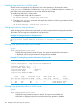
When changing from VLAN mode to port mode, you are prompted with the message shown below.
The VLANs will no longer be configured for loop protection.
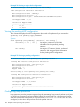
Example 76 Changing modes for loop protection
HP Switch(config)#: loop-protect mode port
Any Loop Protect enabled VLAN will be deleted. Do you want to continue [Y/N]?
N
Viewing loop protection status in port mode
Syntax:
show loop-protect port-list
Displays the loop protection status for ports. If no ports are specified, the information
is displayed only for the ports that have loop protection enabled.
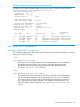
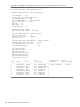
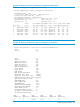
Example 77 Viewing loop protection information for port mode
HP Switch(config)#: show loop-protect 1-2
Status and Counters - Loop Protection Information
Transmit Interval (sec) : 5
Port Disable Timer (sec) : 5
Loop Detected Trap : Enabled
Loop Protect Mode : Port
Loop Protect Enabled VLANs :
Loop Loop Detected Loop Time Since Rx Port
Port Protect Detected on VLAN Count Last Loop Action Status
---- ------- -------- --------- -------- ----------- ---------- ---------
1 Yes Yes NA 1 5s send-disable Down
2 Yes No NA 0 send-disable Up
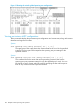
Viewing loop protection status in VLAN mode
Syntax:
show loop-protect port-list
Displays the loop protection status for VLANs. If no ports are specified, the
information is displayed only for the ports that have loop protection enabled.
106 Multiple instance spanning tree operation