
Advanced Traffic Management Guide K/KA/KB.15.15
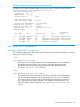
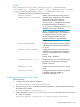
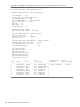
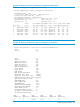


Example 78 Viewing loop protection information for VLAN mode
HP Switch(config)#: show loop-protect 1-2
Status and Counters - Loop Protection Information
Transmit Interval (sec) : 5
Port Disable Timer (sec) : 5
Loop Detected Trap : Enabled
Loop Protect Mode : Vlan
Loop Protect Enabled VLANs : 20,30
Loop Loop Detected Loop Time Since Rx Port
Port Protect Detected on VLAN Count Last Loop Action Status
---- ------- -------- --------- -------- ----------- ---------- ---------
1 Yes Yes 20 1 45s send-disable Down
2 Yes No 0 send-disable Up
STP loop guard
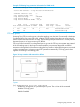
Spanning Tree (STP) is used to ensure a loop-free topology over the LAN. Occasionally a hardware
or software failure can cause STP to fail, creating STP/forwarding loops that can cause network
failures where unidirectional links are used. The non-designated port transitions in a faulty manner
because the port is no longer receiving STP BPDUs.
STP Loop Guard causes the non-designated port to go into the STP loop inconsistent state instead
of the forwarding state. In the loop-inconsistent state the port prevents data traffic and BPDU
transmission through the link, therefore avoiding the loop creation. When BPDUs again are received
on the inconsistent port, it resumes normal STP operation automatically. STP loop guard is best
applied on blocking or forwarding ports.
Figure 16 Loop creation with transmission failure
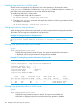
Syntax:
[no] spanning-tree port-list loop-guard
Enables STP loop guard on a particular port or ports. The no form of the command
disables STP loop guard.
Default: Disabled.
Configuring loop protection 107